|
在rsyncd.log里面或.err文件里面,大家可以用记事本打开查看。 注意windows下面我们需要给SvcwRsync用户,管理同步目录的所有权限,基本上这样就可以了 问题一:
{1 M! S3 g" @0 T" A/ t@ERROR: chroot failed
6 S n/ K4 \8 l7 krsync error: error starting client-server protocol (code 5) at main.c(1522) [receiver=3.0.3] & m H8 D7 `8 s" y8 A+ U
Y' s& f: n5 r原因: & `( P0 b3 T" n" F
服务器端的目录不存在或无权限,创建目录并修正权限可解决问题。 ! Y" A, r- Y- X$ w% p3 T" {
0 R6 m' f% N/ {# x# A/ n4 G( z问题二:
& u: r+ _& h! I1 H@ERROR: auth failed on module tee
* W2 n% L+ V; g6 _rsync error: error starting client-server protocol (code 5) at main.c(1522) [receiver=3.0.3] ( K9 `" A& Z/ ~
3 ?! v! i S' {9 v) S; m5 ]. \原因: 6 H1 [! X- A6 J# }0 b7 ^% G* A# U+ U
服务器端该模块(tee)需要验证用户名密码,但客户端没有提供正确的用户名密码,认证失败。
. ~0 B5 J' l$ T0 ^$ X n提供正确的用户名密码解决此问题。 / t' q6 R" y# E/ I, Z" L. `. ]
# v, `/ h& L" r) P+ Z, Q
问题三: ; d5 M& I3 r* W" W
@ERROR: Unknown module ‘tee_nonexists'
& ~& u# F4 |& Y0 l3 ]! z9 mrsync error: error starting client-server protocol (code 5) at main.c(1522) [receiver=3.0.3]
4 d( a. W$ b J" W( m9 m5 l ]# W9 L [3 F/ X
原因:
" x8 n1 O/ @0 A) I* j: }服务器不存在指定模块。提供正确的模块名或在服务器端修改成你要的模块以解决问题。
1 k! V- j& @$ i
4 w1 x4 I- `% _. G* ?7 [, u: f1 \
5 X. e7 |" N% T) O3 U2 C问题1:
. i: x- q, z9 w1 W' j& @" C在client上遇到问题:
' F. K- p* `$ ^9 g3 W8 t6 Ursync -auzv --progress --password-file=/etc/rsync.pas root@192.168.133.128::backup /home/
1 o$ k* R& Y C2 c0 X5 Krsync: could not open password file "/etc/rsync.pas": No such file or directory (2) 3 T) n: s1 p) q3 T8 r
Password:
* W m4 C! A+ `@ERROR: auth failed on module backup 3 ^" G3 Q1 y4 ~
rsync error: error starting client-server protocol (code 5) at main.c(1506) [Receiver=3.0.7]
* z. l& y9 Z' o8 h* K遇到这个问题:client端没有设置/etc/rsync.pas这个文件,而在使用rsync命令的时候,加了这个参数-- 6 r1 C4 S5 |/ f
password-file=/etc/rsync.pas ; F( p* h2 p# a2 w
: C$ m4 t% f& x
问题2:
1 m b2 Q5 d' t0 j' [rsync -auzv --progress --password-file=/etc/rsync.pas root@192.168.133.128::backup /home/ ' T9 u! m2 o! r" \2 Z" @# v0 y+ m
@ERROR: auth failed on module backup
# Z# [+ ^# [9 Grsync error: error starting client-server protocol (code 5) at main.c(1506) [Receiver=3.0.7]
2 f4 q& K* T& j5 U+ e$ n遇到这个问题:client端已经设置/etc/rsync.pas这个文件,里面也设置了密码111111,和服务器一致,但是 5 C$ y* h$ n9 a/ w4 Q
服务器段设置有错误,服务器端应该设置/etc/rsync.pas ,里面内容root:111111 ,这里登陆名不可缺少 ' ~4 r& K8 \, p& `/ y
$ u2 ?0 U5 [1 K7 e' R/ x# V问题3: : ^5 b5 ?7 L+ p; x; c
rsync -auzv --progress --password-file=/etc/rsync.pas root@192.168.133.128::backup /home/ 0 b! u2 j1 O3 x; p: G% E- N9 v
@ERROR: chdir failed
( M3 @1 {% w( ~' z4 j. Mrsync error: error starting client-server protocol (code 5) at main.c(1506) [Receiver=3.0.7] : S' K9 J/ J4 ?- E/ E
遇到这个问题,是因为服务器端的/home/backup 其中backup这个目录并没有设置,所以提示:chdir failed 7 X, [& Y5 B- A; |
/ C, k; z& w' w$ W
问题4: " {; O0 ?6 j- d: Q4 ?0 a
rsync: write failed on "/home/backup2010/wensong": No space left on device (28)
# `! w* W |3 ^7 Y% h- z0 C; ?rsync error: error in file IO (code 11) at receiver.c(302) [receiver=3.0.7] ) Y, r8 y3 @& c i) C; O
rsync: connection unexpectedly closed (2721 bytes received so far) [generator]
& e R0 }% M1 S, Srsync error: error in rsync protocol data stream (code 12) at io.c(601) [generator=3.0.7]
7 y- o* w8 x1 Q' f7 p0 n磁盘空间不够,所以无法操作。
$ S6 P: Q- `7 M( \& P可以通过df /home/backup2010 来查看可用空间和已用空间 # l$ h: C# ^! `) o
3 u" w0 I3 y5 U; s9 l1 ^3 }2 B" N
问题5:网络收集问题
0 T1 B& h) J7 ~- u2 I9 |1、权限问题 x2 s( Z; ]% w7 l) V
类似如下的提示:rsync: opendir "/kexue" (in dtsChannel) failed: Permission denied (13)注意查看同步的目录权限是否为755
7 ]* u1 Q1 ~/ n2、time out
9 a/ T/ }3 c3 X/ j9 M# @rsync: failed to connect to 203.100.192.66: Connection timed out (110) : c) G" W5 e4 j5 N o1 s
rsync error: error in socket IO (code 10) at clientserver.c(124) [receiver=3.0.5]
8 V' h% p, E! Q! H检查服务器的端口netstat –tunlp,远程telnet测试。
* d/ a, ?$ p+ e- z! R# X可能因为客户端或者服务端的防火墙开启 导致无法通信,可以设置规则放行 rsync(873端口) 或者直接关闭防火墙。 : j1 J) R* S q% X6 Y
: w8 H E- p! [/ Q2 C- Y
还有一种在同步过程中可能会提示没有权限 (将同步目录加上SvcwRsync全部权限即可,更简单的方法就是将SvcwRsync设为管理员即可)7 X' r' y6 w, f, I
2 z% [8 R& [! ]) W" R( H- b5 X' m9 m! n( R. U! R
3、服务未启动 ' c$ j0 q7 E/ f! | S0 P
rsync: failed to connect to 10.10.10.170: Connection refused (111)
- W! v$ ~9 e4 a- y6 r; f ?' N n& k# `rsync error: error in socket IO (code 10) at clientserver.c(124) [receiver=3.0.5] ; \! ~; \- i7 k( F: Z& x, A* M
启动服务:rsync --daemon --config=/etc/rsyncd.conf
& ?4 ?: Q4 O# ~4 M. }( \- H4、磁盘空间满 0 e: y$ q# z9 _
rsync: recv_generator: mkdir "/teacherclubBackup/rsync……" failed: No space left on device (28)
5 p+ u: q& N6 A8 t. J6 m*** Skipping any contents from this failed directory *** 1 q3 D1 F! l4 b% A. l) n
5、Ctrl+C或者大量文件
3 r, h' {8 F7 Rrsync error: received SIGINT, SIGTERM, or SIGHUP (code 20) at rsync.c(544) [receiver=3.0.5]
" e. c3 u8 {" grsync error: received SIGINT, SIGTERM, or SIGHUP (code 20) at rsync.c(544) [generator=3.0.5]
+ B" Z+ A- p- H# g& k! n: `" I说明:导致此问题多半是服务端服务没有被正常启动,到服务器上去查查服务是否有启动,然后查看下 /var/run/rsync.pid 文件是否存在,最干脆的方法是杀死已经启动了服务,然后再次启动服务或者让脚本加入系统启动服务级别然后shutdown -r now服务器
5 ]( a/ x0 C" B1 F$ L, V! ^/ Z3 M' D
6、xnetid启动 8 D/ j. Y% C' V. \
rsync: read error: Connection reset by peer (104)
& \8 C4 F6 y: b. |( \2 l: s# Z8 Y9 arsync error: error in rsync protocol data stream (code 12) at io.c(759) [receiver=3.0.5] ^( ?5 E" O4 k Y4 R$ t& p
查看rsync日志
) W$ E9 J5 G/ z/ G# Hrsync: unable to open configuration file "/etc/rsyncd.conf": No such file or directory
3 D. ^$ L0 _. Q# |3 |xnetid查找的配置文件位置默认是/etc下,根据具体情况创建软链接。例如: + U1 C9 z2 H, \1 B2 m4 P( H
ln -s /etc/rsyncd/rsyncd.conf /etc/rsyncd.conf ( }8 s+ [ D9 s' `
或者更改指定默认的配置文件路径,在/etc/xinetd.d/rsync配置文件中。 5 K; K( y4 c$ M- r+ k9 ~8 b# ^
Rsync configure:
. ]8 p# z* x ^% n' ?2 V配置一:) O0 m5 E1 }. L% d$ o; ?; m
ignore errors2 @* _, O t* a1 C- X$ |
说明:这个选项最好加上,否则再很多crontab的时候往往发生错误你也未可知,因为你不可能天天去看每时每刻去看log,不加上这个出现错误的几率相对会很高,因为任何大点的项目和系统,磁盘IO都是一个瓶颈
& n3 a; g" |5 u- j+ H3 g) p2 `; _3 \7 y
Rsync error: & ^2 r. i3 T$ Y% A# h0 T! W+ \
错误一:
8 w) L* V7 u+ Y5 `0 X7 j@ERROR: auth failed on module xxxxx $ f4 o' T9 O; k# C$ K
rsync: connection unexpectedly closed (90 bytes read so far)
5 f1 x; w( ~2 l# Nrsync error: error in rsync protocol data stream (code 12) at io.c(150) & t: z8 w0 u% G! I' N
说明:这是因为密码设置错了,无法登入成功,检查一下rsync.pwd,看客服是否匹配。还有服务器端没启动rsync 服务也会出现这种情况。 错误二:
1 Z/ b5 Z5 D& c0 Z! { Mpassword file must not be other-accessible 9 F/ g% C6 K% f9 w4 Y- s
continuing without password file
. Q* V4 |+ }( V/ y; @% t6 f+ G+ jPassword:
$ y t% T# {" m# c$ L说明:这是因为rsyncd.pwd rsyncd.sec的权限不对,应该设置为600。如:chmod 600 rsyncd.pwd 错误三: + h0 x# C: }4 p9 S: B
@ERROR: chroot failed
2 [) l! [1 f7 v* A) Brsync: connection unexpectedly closed (75 bytes read so far)
' U: n3 U/ r; T0 E3 U) Lrsync error: error in rsync protocol data stream (code 12) at io.c(150)
) z }3 A0 `- j( m! \说明:这是因为你在 rsync.conf 中设置的 path 路径不存在,要新建目录才能开启同步 错误四:
7 Q: l: V- L' ^rsync: failed to connect to 218.107.243.2: No route to host (113) ( Q! E) x7 \( y5 T1 r
rsync error: error in socket IO (code 10) at clientserver.c(104) [receiver=2.6.9]
: w; H) c g5 W+ p, d2 q4 y说明:防火墙问题导致,这个最好先彻底关闭防火墙,排错的基本法就是这样,无论是S还是C,还有ignore errors选项问题也会导致+ p2 a/ n$ y" i2 c+ `$ ?
8 E& j3 O, l8 Q$ X
错误五:8 B6 F( }1 m3 ~( e( \9 w- A1 x! f
@ERROR: access denied to www from unknown (192.168.1.123)
/ I, k9 o* F" yrsync: connection unexpectedly closed (0 bytes received so far) [receiver]) j9 M2 x1 s9 E- I' P
rsync error: error in rsync protocol data stream (code 12) at io.c(359)
4 \% M+ J7 o, h# M$ U! Z: L% ~& r说明:此问题很明显,是配置选项host allow的问题,初学者喜欢一个允许段做成一个配置,然后模块又是同一个,致使导致 错误六:2 J9 w2 ]9 g& d( W5 i* ~7 s
rsync error: received SIGINT, SIGTERM, or SIGHUP (code 20) at rsync.c(244) [generator=2.6.9]
% o( v% z/ z- f# s# a3 Wrsync error: received SIGUSR1 (code 19) at main.c(1182) [receiver=2.6.9]2 u: O# n0 M% X+ ~$ N
说明:导致此问题多半是服务端服务没有被正常启动,到服务器上去查查服务是否有启动,然后查看下 /var/run/rsync.pid 文件是否存在,最干脆的方法是杀死已经启动了服务,然后再次启动服务或者让脚本加入系统启动服务级别然后shutdown -r now服务器 错误七:0 ]4 @2 n6 l8 L$ ?& [9 F; M9 P
rsync: read error: Connection reset by peer (104)
9 ?4 D* H, v: r# m8 Prsync error: error in rsync protocol data stream (code 12) at io.c(604) [sender=2.6.9]
! x+ |) X/ V$ S g0 Y& @说明:原数据目录里没有数据存在
3 v) j$ G5 Z) c9 R8 l rsync 错误与解决方法整理补充篇 由于我们经常使用rsync进行服务器文件的同步工作,但在配置过程中,会出现很多问题,下面的错误基本上都是通过客户端返回的错误进行分析。 另外查找错误过程中也学到了一个查看错误的方法-查看系统日志,我们操作的每步都会在日志上有说明,有时候报错看不懂,日志上都写的清清楚楚。 命令:cat /var/log/messages 问题一: @ERROR: auth failed on module bachup
9 P' Y/ M5 |& z. H rsync error: error starting client-server protocol (code 5) at main.c(1522) [receiver=3.0.3] 原因:服务器端该模块(backup)需要验证用户名密码,但客户端没有提供正确的用户名密码,认证失败。 提供正确的用户名密码解决此问题。
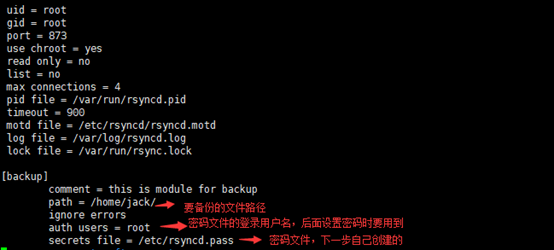
& U4 M: @% X* ]5 R8 d4 Z( ]" x这个问题比较蠢,如果可能你和我一样明明在模块里写了密码文件,怎么都不通,这个时候我劝你先检查一下所写模块中是不是和下图一样。比如,某处多了个s。4 g6 _ H0 T( m- Q: @9 N3 r
 微信图片_20210306223602.p ... 微信图片_20210306223602.p ...
问题二:110错误 -time out rsync: failed to connect to 203.100.192.66: Connection timed out (110) & ~) W: ?& s, l6 v, y- I
rsync error: error in socket IO (code 10) at clientserver.c(124) [receiver=3.0.5] 原因: 检查服务器的端口netstat –tunlp,远程telnet测试。 可能因为客户端或者服务端的防火墙开启 导致无法通信,可以设置规则放行 rsync(873端口) 或者直接关闭防火墙。 5 x( }& P( w- G# p: U1 X& @
在这里博主是重启过服务器,然后就报110了,直接开启rsync服务就行。 命令:service rsyncd start 问题三:113错误 -防火墙
' Q" ~8 Q4 K! [/ z4 Ursync: failed to connect to 218.107.243.2: No route to host (113) rsync error: error in socket IO (code 10) at clientserver.c(104) [receiver=2.6.9]
; \' G6 n i$ h: |4 h! w原因:! Z' h6 [/ o+ Z0 k2 s u* V
防火墙问题导致,这个很简单,关闭防火墙就可以。不过博主还是被困在这里几个小时,因为linux防火墙分两种: -iptable和-firewall
, g3 V$ x. p: u3 Y1 ~- z9 F6 b认识到这个问题首先查看系统的防火墙种类,查看防火墙状态即可& I3 J( ]' H7 f+ P- E1 O
service iptable status
{1 f5 `. ~7 p' A4 o8 ffirewall-cmd --state 确定防火墙种类后再按对应方法将防火墙关闭即可。 问题四:1516错误 @ERROR: auth failed on module backup3 }& j! f7 c+ a5 h' Q5 s
rsync error: error starting client-server protocol (code 5) at main.c(1516) [Receiver=3.0.9]
7 E5 z" \: r* I 
4 I8 i9 h4 i n; B5 ?
# a. \3 h) D. G3 Z- F
( e) U7 u' g z9 Y0 V* W8 B微信图片_20210306223651.p ...
. \' N2 W( M5 k9 B+ I7 ^& e9 P9 X
+ c* `+ c3 A U) _' `! y; _5 n/ A2 O$ a6 x
解决:这个问题错误差别很大,可查看系统日志查看错误,再搜索解决方法。 注意:一般这种情况都建立在可以连通的基础。去服务端查看系统日志,可以查看相关错误。 命令:cat /var/log/massages cat /var/log/rsyncd.log |





 发表于 2021-3-6 22:37:20