|
当用户通过Console口登录设备实现本地维护时,可以根据使用需求或对设备安全的考虑,配置相应的Console用户界面属性。这些属性并不是必须要配置的,用户可以结合实际需求和安全性考虑选择配置。 通过MiniUSB口登录设备使用的也是Console用户界面,因此配置的Console用户界面属性也会作用于MiniUSB口登录。 1、设置通过账号和密码(AAA验证)登陆console口 1.1、进入Console用户界面视图 [Huawei]user-interface console 0 [Huawei-ui-console0] 1.2、设置用户验证方式为AAA验证 [Huawei-ui-console0]authentication-mode ? aaa AAA authentication none Login without checking # 无需验证直接登陆console口 password Authentication through the password of a user terminal interface # 只通过输入密码登陆console口 [Huawei-ui-console0]authentication-mode aaa 1.3、进入AAA视图 [Huawei-ui-console0]q [Huawei]aaa [Huawei-aaa] 1.4、配置登陆console口的账号和密码 [Huawei-aaa]local-user ? STRING<1-64> User name, in form of 'user@domain'. Can use wildcard '*', while displaying and modifying, such as *@isp,user@*,*@*.Can not include invalid character / \ : * ? " < > | @ ' access-limit Set access limit of user(s) ftp-directory Set user(s) FTP directory permitted idle-timeout Set the timeout period for terminal user(s) password Set password privilege Set admin user(s) level service-type Service types for authorized user(s) state Activate/Block the user(s) user-group User group cipher User password with cipher text 1.5、设置登陆console的账号和密码的服务类型为console(terminal)类型 8021x 802.1x user bind Bind authentication user ftp FTP user http Http user l2tp L2tp user ppp PPP user ssh SSH user sslvpn Sslvpn user telnet Telnet user terminal Terminal user web Web authentication user x25-pad X25-pad user 8021x 802.1x user bind Bind authentication user ftp FTP user http Http user l2tp L2tp user ppp PPP user ssh SSH user sslvpn Sslvpn user telnet Telnet user web Web authentication user x25-pad X25-pad user <cr> 2、设置只通过密码登陆console口 2.1、设置只通过密码登陆console口 [Huawei-ui-console0]authentication-mode password 2.2、设置验证密码,输入的密码可以是明文或密文 [Huawei-ui-console0]set authentication ? password Set the password for a user interface [Huawei-ui-console0]set authentication password ? cipher Set the password with cipher text simple Set the password in plain text [Huawei-ui-console0]set authentication password cipher ? STRING<1-16>/<24> Plain text/cipher text password [Huawei-ui-console0]dis th # user-interface con 0 authentication-mode aaa set authentication password cipher }GUbE_&zC@|8z[/:Cq23'O1# user-interface vty 0 4 user-interface vty 16 20 # return [Huawei-ui-console0] 输入的密码可以是明文或者密文,当不指定cipher password参数时,将采用交互方式输入明文密码,当指定cipher password参数时,既可以输入明文密码也可以输入密文密码,但都将以密文形式保存在配置文件中。 当用户输入密码时,直接以明文形式输入存在安全风险,建议用户以交互式方式输入。 3、设置直接登陆console口,无需验证 [Huawei-ui-console0]authentication-mode none 4、配置Console用户界面的用户优先级 用户可以配置用户优先级,实现对不同用户访问设备权限的限制,增加设备管理的安全性。用户的优先级分为16个级别,级别标识为0~15,标识越高则优先级越高。用户的优先级和命令的优先级是相对应的,即用户只能使用等于或低于自己级别的命令。 缺省情况下,Console口用户界面对应的默认命令访问级别是15。 如果用户界面下配置的命令级别访问权限与用户名本身对应的操作权限冲突,以用户名本身对应的级别为准。 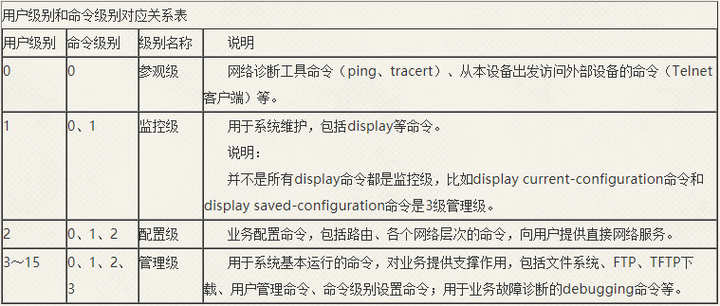 [Huawei-ui-console0]user privilege level ? INTEGER<0-15> Set a priority 5、设置用户登录超时时间 设置用户连接的超时时间为0或者过长会导致终端一直处于登录状态,存在安全风险,建议用户执行命令lock锁定当前连接。 [Huawei-ui-console0]idle-timeout ? INTEGER<0-35791> Set the number of minutes before a terminal user times out(default: 10minutes) 6、设置终端屏幕每屏显示的行数 [Huawei-ui-console0]screen-length ? INTEGER<0-512> Display the number of lines on a screen (the value 0 indicates none split screen, and the default value is 24) 7、设置终端屏幕显示的列数 [Huawei-ui-console0]screen-width ? INTEGER<60-512> Screen width value, the default is 80 8、设置历史命令缓存条数 [Huawei-ui-console0]history-command ? max-size Set the size of the maximum history buffer, the default value is 10 [Huawei-ui-console0]history-command max-size ? INTEGER<0-256> The size of a history buffer 9、设置console口传输速率 [Huawei-ui-console0]speed ? 300 Only asynchronous serial user terminal interfaces can be configured 600 Only asynchronous serial user terminal interfaces can be configured 1200 Only asynchronous serial user terminal interfaces can be configured 4800 Only asynchronous serial user terminal interfaces can be configured 9600 Only asynchronous serial user terminal interfaces can be configured 19200 Only asynchronous serial user terminal interfaces can be configured 38400 Only asynchronous serial user terminal interfaces can be configured 57600 Only asynchronous serial user terminal interfaces can be configured 115200 Only asynchronous serial user terminal interfaces can be configured 10、设置console口流控方式 [Huawei-ui-console0]flow-control ? hardware Hardware flow control mode # 硬件方式 none None flow control mode # 无 software Software flow control mode # 软件方式 11、设置console口校验位 [Huawei-ui-console0]parity ? even Even check mode # 偶校验方式 mark Mark check mode # Mark校验方式 none None check mode # 无校验 odd Odd check mode # 奇校验方式 space Space check mode # Space校验方式 12、设置console口停止位 [Huawei-ui-console0]stopbits ? 1.5 One-and-half-bit stop bit 1 One-bit stop bit 2 Two-bit stop bit 13、设置console口数据位 [Huawei-ui-console0]databits ? 5 5-bit databits 6 6-bit databits 7 7-bit databits 8 8-bit databits 14、查看Console用户界面信息 <Huawei>display user-interface console 0 Idx Type Tx/Rx Modem Privi ActualPrivi Auth Int + 0 CON 0 9600 - 3 3 P - + : Current UI is active. F : Current UI is active and work in async mode. Idx : Absolute index of UIs. Type : Type and relative index of UIs. Privi: The privilege of UIs. ActualPrivi: The actual privilege of user-interface. Auth : The authentication mode of UIs. A: Authenticate use AAA. N: Current UI need not authentication. P: Authenticate use current UI's password. Int : The physical location of UIs. |





 发表于 2022-2-24 15:51:12