|
netns 可以创建一个完全隔离的新网络环境,这个环境包括一个独立的网卡空间,路由表,ARP表,ip地址表,iptables等。总之,与网络有关的组件都是独立的。! Y4 v) M7 b, v" v( Q
7 Y" e" d1 _+ w) n1 S* H9 C
创建网络空间: # ip netns add ns1- f4 D% h5 N8 l9 y( |/ |! X
查看网络空间: # ip netns list& N. l& y# m7 |% Z9 m1 j" ~
删除网络空间: # ip netns del ns14 T7 }# }) ? J1 g) C
进入网络空间执行命令: # ip netns exec ns1 `command`
9 J1 Y3 f& Z3 f+ \
, l* f; f* y1 J% n) M实例一:
, v9 [# E4 j2 A' n 用netns连接两个隔离环境中的虚拟机,如图:
2 L A# u) v) T+ d7 y 在虚拟化中有两个虚拟机网络隔离环境需要通信。 系统: centos7.2 x64 安装程序包# yum install bridge-utils libvirt libvirt-client virt-install virt-viewer net-tools -y# brctl addbr br0# brctl addbr br1# ifconfig br0 up# ifconfig br1 up
, {; d9 k0 |& i% b" ~取消默认nat网络模式# mv /etc/libvirt/qemu/networks/default.xml /etc/libvirt/qemu/networks/default.xml_bak# systemctl start libvirtd" c7 B* M4 \! _% t
创建虚拟机并连接至br0# virt-install --name vm1 --ram 512 --vcpus=1 --disk /images/linux/cirros-0.3.5-i386-disk-1.img --network bridge=br0,model=virtio --force --import --nographics --serial=pty --console=pty打开第二个终端创建第二个虚拟机并连接至br1# virt-install --name vm2 --ram 512 --vcpus=1 --disk /images/linux/cirros-0.3.5-i386-disk-2.img --network bridge=br1,model=virtio --force --import --nographics --serial=pty --console=pty# brctl showbridge name bridge id STP enabled interfacesbr0 8000.fe54007e1861 no vnet0br1 8000.fe5400be1885 no vnet1
/ y; T. o' U( D" a4 q到此,虚拟机已经连接上各自的桥设备了。完成如图:
1 [( ^5 A6 H7 D0 Q8 k; U e7 ?创建虚拟网络空间:# ip netns add ns1# ip netns listns1: f% G/ h* ~/ S& y
接下来创建一张虚拟网卡,虚拟网卡分为前半段和后半段,我们将前半段添加到br0中,并将后半段添加到虚拟网络空间中,这样br0桥设备中主机就能够连接到虚拟网络空间中。 # ip link add net-in type veth peer name net-out# ifconfig net-in up# ifconfig net-out up& n- a7 b. P2 q2 t
将net-in虚拟网卡添加到br0中,将net-out虚拟网卡添加到ns1中 # brctl addif br0 net-in查看是否添加成功# brctl show br0bridge name bridge id STP enabled interfacesbr0 8000.46c7e9d2c0fa no net-in vnet0
* O2 S* n ^$ p- S4 }将net-out添加到ns1中,并重命名为eth0# ip link set dev net-out name eth0 netns ns14 N' N& I# G' \5 y1 @( B
查看是否添加成功# ip netns exec ns1 ifconfig -aeth0: flags=4098<BROADCAST,MULTICAST> mtu 1500 ether a2:07:dc:ba:35:a2 txqueuelen 1000 (Ethernet) RX packets 0 bytes 0 (0.0 B) RX errors 0 dropped 0 overruns 0 frame 0 TX packets 0 bytes 0 (0.0 B) TX errors 0 dropped 0 overruns 0 carrier 0 collisions 0lo: flags=8<LOOPBACK> mtu 65536 loop txqueuelen 0 (Local Loopback) RX packets 0 bytes 0 (0.0 B) RX errors 0 dropped 0 overruns 0 frame 0 TX packets 0 bytes 0 (0.0 B) TX errors 0 dropped 0 overruns 0 carrier 0 collisions 0# ip netns exec ns1 ifconfig lo up
4 C9 u; ^8 w' F+ `/ U) y6 r- d现在vm1 --> br0 --> ns1 网络做通了,完成如下图:
( N- A( c" S+ {/ l, I同理,和上面操作一样。 # ip link add net1-in type veth peer name net1-out# ifconfig net1-in up# ifconfig net1-out up# brctl addif br1 net1-in# brctl show br1bridge name bridge id STP enabled interfacesbr1 8000.1291a963b290 no net1-in vnet1# ip link set dev net1-out name eth1 netns ns1
' `' u P4 ~. b, O" M1 T J& I6 D) A' e! \
# ip netns exec ns1 ifconfig -aeth0: flags=4098<BROADCAST,MULTICAST> mtu 1500 ether a2:07:dc:ba:35:a2 txqueuelen 1000 (Ethernet) RX packets 0 bytes 0 (0.0 B) RX errors 0 dropped 0 overruns 0 frame 0 TX packets 0 bytes 0 (0.0 B) TX errors 0 dropped 0 overruns 0 carrier 0 collisions 0eth1: flags=4098<BROADCAST,MULTICAST> mtu 1500 ether 02:d4:3c:7d:3b:2e txqueuelen 1000 (Ethernet) RX packets 0 bytes 0 (0.0 B) RX errors 0 dropped 0 overruns 0 frame 0 TX packets 0 bytes 0 (0.0 B) TX errors 0 dropped 0 overruns 0 carrier 0 collisions 0lo: flags=73<UP,LOOPBACK,RUNNING> mtu 65536 inet 127.0.0.1 netmask 255.0.0.0 inet6 ::1 prefixlen 128 scopeid 0x10<host> loop txqueuelen 0 (Local Loopback) RX packets 0 bytes 0 (0.0 B) RX errors 0 dropped 0 overruns 0 frame 0 TX packets 0 bytes 0 (0.0 B) TX errors 0 dropped 0 overruns 0 carrier 0 collisions 0
' H q- v, Z0 D7 B$ r4 aip地址配置如下:5 X0 d% m$ F& B l* w3 }* S
0 P9 P! k( }9 ?) E( Q
vm1 - eth0 : 192.168.1.2& w5 z! u+ v: J% T7 r: p2 G" m
ns1 - eth0 : 192.168.1.19 G9 q+ J% x* I" T9 K( y( }3 F
; E( l) g, J; g! ?
vm2 - eth0 : 172.168.10.25 E/ F. v/ ^% z6 j
ns1 - eth0 : 172.168.10.1 记住:当宿主机开启了网络转发功能,虚拟网络空间才会开启,在以上场景中,必须开启网络转发功能。 # sysctl -w net.ipv4.ip_forward=1net.ipv4.ip_forward = 1
: l( A) [; I% S0 M% O5 u/ b% m# r, o5 b) F/ ~" U
vm1 - eth0 网络配置如下: # ifconfig lo up # ifconfig eth0 192.168.1.2/24 up# ifconfig eth0 Link encap:Ethernet HWaddr 52:54:00:7E:18:61 inet addr:192.168.1.2 Bcast:192.168.1.255 Mask:255.255.255.0 inet6 addr: fe80::5054:ff:fe7e:1861/64 Scope:Link UP BROADCAST RUNNING MULTICAST MTU:1500 Metric:1 RX packets:8 errors:0 dropped:0 overruns:0 frame:0 TX packets:2 errors:0 dropped:0 overruns:0 carrier:0 collisions:0 txqueuelen:1000 RX bytes:648 (648.0 B) TX bytes:168 (168.0 B)lo Link encap:Local Loopback inet addr:127.0.0.1 Mask:255.0.0.0 inet6 addr: ::1/128 Scope:Host UP LOOPBACK RUNNING MTU:16436 Metric:1 RX packets:0 errors:0 dropped:0 overruns:0 frame:0 TX packets:0 errors:0 dropped:0 overruns:0 carrier:0 collisions:0 txqueuelen:0 RX bytes:0 (0.0 B) TX bytes:0 (0.0 B)5 b! \9 S- w3 p& E8 f
ns1 - eth0 网络配置如下: # ip netns exec ns1 ifconfig lo up# ip netns exec ns1 ifconfig eth0 192.168.1.1/24 up# ip netns exec ns1 ifconfig eth0eth0: flags=4099<UP,BROADCAST,MULTICAST> mtu 1500 inet 192.168.1.1 netmask 255.255.255.0 broadcast 192.168.1.255 ether a2:07:dc:ba:35:a2 txqueuelen 1000 (Ethernet) RX packets 0 bytes 0 (0.0 B) RX errors 0 dropped 0 overruns 0 frame 0 TX packets 0 bytes 0 (0.0 B) TX errors 0 dropped 0 overruns 0 carrier 0 collisions 00 C3 _1 c5 i& H6 `0 G, R. M" U- @
# g( J7 I) e. m- M7 F" S- G1 Y, S( evm2 - eth0 网络配置如下: # ifconfig lo up# ifconfig eth0 172.168.10.2/24 up# ifconfig eth0eth0 Link encap:Ethernet HWaddr 52:54:00:BE:18:85 inet addr:172.168.10.2 Bcast:172.168.255.255 Mask:255.255.0.0 inet6 addr: fe80::5054:ff:febe:1885/64 Scope:Link UP BROADCAST RUNNING MULTICAST MTU:1500 Metric:1 RX packets:8 errors:0 dropped:0 overruns:0 frame:0 TX packets:2 errors:0 dropped:0 overruns:0 carrier:0 collisions:0 txqueuelen:1000 RX bytes:648 (648.0 B) TX bytes:168 (168.0 B)
( \6 C# J, C% ]! |
/ e0 i3 Z. O( A: B# ]; Mns1 - eth1 网络配置如下: # ip netns exec ns1 ifconfig eth1 172.168.10.1/24 up# ip netns exec ns1 ifconfig eth1eth1: flags=4099<UP,BROADCAST,MULTICAST> mtu 1500 inet 172.168.10.1 netmask 255.255.255.0 broadcast 172.168.10.255 ether 02:d4:3c:7d:3b:2e txqueuelen 1000 (Ethernet) RX packets 0 bytes 0 (0.0 B) RX errors 0 dropped 0 overruns 0 frame 0 TX packets 0 bytes 0 (0.0 B) TX errors 0 dropped 0 overruns 0 carrier 0 collisions 0
' j4 ]8 _ ~5 t3 F9 F C& K9 s2 U$ G4 e4 m5 {# l+ \
为虚拟机指定路由: vm1 :# ping 192.168.1.1 -c1PING 192.168.1.1 (192.168.1.1): 56 data bytes64 bytes from 192.168.1.1: seq=0 ttl=64 time=0.811 ms--- 192.168.1.1 ping statistics ---1 packets transmitted, 1 packets received, 0% packet lossround-trip min/avg/max = 0.811/0.811/0.811 ms# ip route add default via 192.168.1.1, p( V- v6 s* z9 G: {: l
注意:如果ping不通,请检查链路上的网卡状态是否是up状态。 vm2 :# ping 172.168.10.1 -c1PING 172.168.10.1 (172.168.10.1): 56 data bytes64 bytes from 172.168.10.1: seq=0 ttl=64 time=2.385 ms--- 172.168.10.1 ping statistics ---1 packets transmitted, 1 packets received, 0% packet lossround-trip min/avg/max = 2.385/2.385/2.385 ms添加默认路由# ip route add default via 172.168.10.1
P2 C& e: [" I* v$ K; L! s8 o3 F. _$ ^' c* A6 _2 v
接下来,使用ping测试。 vm1 - eth0 : 192.168.1.2 --> ns1 - eth1 : 172.168.10.1# ping 172.168.10.1 -c1PING 172.168.10.1 (172.168.10.1): 56 data bytes64 bytes from 172.168.10.1: seq=0 ttl=64 time=0.426 ms--- 172.168.10.1 ping statistics ---1 packets transmitted, 1 packets received, 0% packet lossround-trip min/avg/max = 0.426/0.426/0.426 ms能够达到ns1 eth1网卡,说明ns1从eth0 - 192.168.10.1 转发到了 172.168.10.1vm1 - eth0 : 192.168.1.2 --> vm2 - eth0 : 172.168.10.29 X: h- X: B/ F% x8 b
, O4 A+ t) L7 ]8 [) q
2 q4 X; x) f9 i% Q
这样,就完成了在宿主机中,两个虚拟主机隔离模式的通信。
2 ~+ o4 R- q. G% z" J1 t' U7 R. T3 Y- b2 V: S6 E
实例二: 9 C; D# E r% F) H4 v( a" K! ]: ^
- y/ R* e( [: v; a 说明:宿主机中两组隔离模型,其中只有一组可以访问公网
接下来,在模式一的基础上进行修改:: @$ h% `$ Y1 j! f7 ~6 J
5 t% l9 V& k Y# c1 ^0 m # ip netns del ns1- ?* ?0 ]0 w/ e' z2 [+ A! U1 m
! i9 S& r; \1 G; R" b5 g删除虚拟网络空间模式,所有和虚拟网络空间有关的虚拟网卡都会被删除。
现在的模式如下:
" h- I( r9 u: }: q3 e+ p3 ?vm1: 192.168.1.2/243 Q+ W3 e2 K1 s
vm2: 192.168.1.2/24
' D; A. z K. d" p8 `ns1: 192.168.1.1/247 @' c3 ?- K8 k: f* \, O
* ^/ w- a @+ x* l6 p! M
这里故意把vm1和vm2的ip设置为一样,方便我们进行测试。 添加虚拟网络空间# ip netns add ns1# ip link add net-in type veth peer name net-out# ifconfig net-in up# ifconfig net-out up+ M2 E: e( m* Q! A, a7 P/ e2 ~/ \2 e
添加net-in到br0,添加net-out到虚拟网络空间ns1# brctl addif br0 net-in# ip link set dev net-out name eth0 netns ns1为ns1启动网卡并配置ip地址# ip netns exec ns1 ifconfig lo up# ip netns exec ns1 ifconfig eth0 192.168.1.1 netmask 255.255.255.0 up
" v/ ]/ b( M' h为vm1配置网关为192.168.1.12 w! c& l. {" w+ ?1 i7 O! R+ X
% s, w! b7 u. D
创建桥设备,并将物理网卡添加到桥设备中,这里建议直接修改物理网卡配置文件 cp -a ifcfg-eno16777736 ifcfg-br-out# vim ifcfg-eno16777736 TYPE=EthernetBOOTPROTO=noneDEFROUTE=yesPEERDNS=yesPEERROUTES=yesIPV4_FAILURE_FATAL=noIPV6INIT=noNAME=eno16777736UUID=100e462e-c0d0-4271-9b5a-1c8e47ff0d03DEVICE=eno16777736ONBOOT=yesBRIDGE=br-out# vim ifcfg-br-out TYPE=BridgeBOOTPROTO=noneDEFROUTE=yesPEERDNS=yesPEERROUTES=yesIPV4_FAILURE_FATAL=noIPV6INIT=noNAME=br-outDEVICE=br-outONBOOT=yesIPADDR=10.0.0.11NETMASK=255.255.255.0GATEWAY=10.0.0.1DNS1=10.0.0.1DNS2=114.114.114.114重启下网络# systemctl restart network物理网卡添加成功# brctl show br-outbridge name bridge id STP enabled interfacesbr-out 8000.000c2923e15d no eno16777736- C2 q% u5 i" {: K+ i/ L8 m7 k
9 }/ v# P& G7 E! c r* A
现在创建一对网卡,连接ns1和br-out
. }+ v( @0 L; ]3 q$ q% C1 ]! w# ip link add net1-in type veth peer name net1-out# ifconfig net1-in up# ifconfig net1-out up# ip link set dev net1-in name eth1 netns ns1# brctl addif br-out net1-out# brctl show br-outbridge name bridge id STP enabled interfacesbr-out 8000.000c2923e15d no eno16777736 net1-out
7 q8 O9 O+ u+ p+ d C [
8 z: V1 q- _, @# H# W) {我真实局域网的ip为10.0.0.0/244 d2 d. c% n' K5 U- E
. i" e" B }8 t* P+ ^' h0 \
因此添加到ns1中的eth1要配置到同网段 # ip netns exec ns1 ifconfig eth1 10.0.0.12 netmask 255.255.255.0 up
9 ^1 p9 Y# h5 H- H( S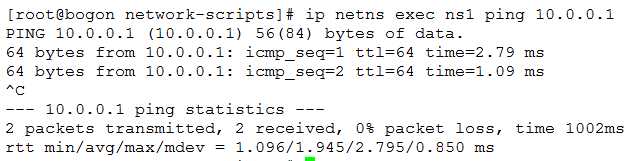
: U- t* s8 C4 F% X% o. Y
能够到达网关了。; q0 o( F: A$ j- ?5 \
! E S9 h* N6 ~" k* s% M0 u. n
已实现如下: 2 {- U+ X! D9 p, J& ~0 R2 j
在ns1中添加源地址转换 # ip netns exec ns1 iptables -t nat -A POSTROUTING -s 192.168.1.0/24 ! -d 192.168.1.0/24 -j SNAT --to-source 10.0.0.12# ip netns exec ns1 ip route default via 10.0.0.1
! | W. h8 u" D& H. b再次通过vm1 ping 公网ip
! O* c$ |, f+ z7 ~6 y( q6 f! {2 T/ h& z. Y. R: e" {# D
这样就实现了宿主机内部分网络中的主机可以访问公网,部分主机没有访问公网权限。
6 r( f1 {! Y8 }# _2 }/ X总之,网络逻辑很重要。
: n+ u5 A9 y6 Z1 a) ~1 Y# S2 J- p |





 发表于 2019-6-21 15:02:52