|
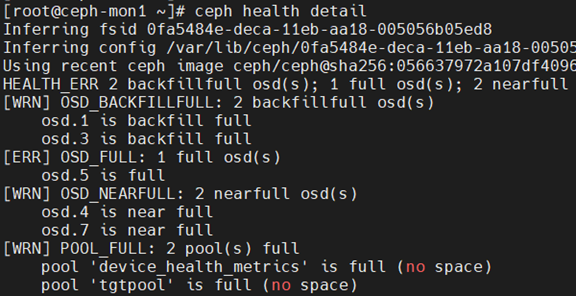
检查结果: ceph health detail
* P) w* m2 l: w2 n& `ceph df
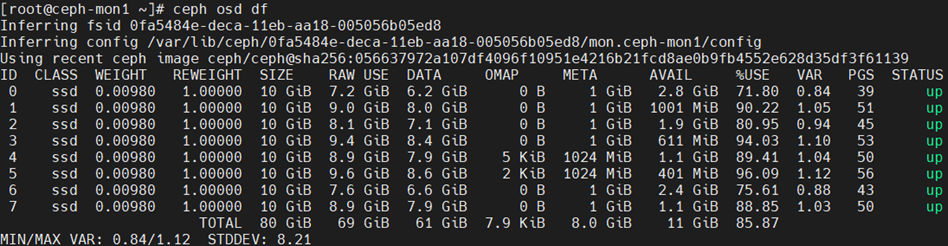
% D* Z5 F6 [( ?6 T4 [. q8 _ceph osd df . R3 z3 j7 `0 I
ceph osd dump | grep full_ratio & S7 D4 }4 x0 L" m# t
* m u; m& k0 _4 w) F2 ]7 c' l8 E
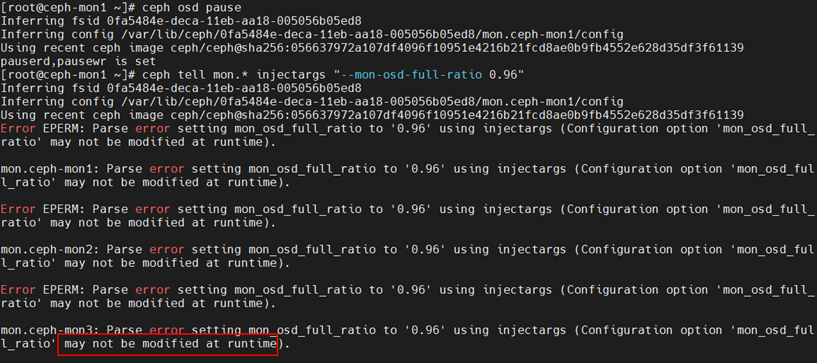
网络的解决方法: 1. 设置 osd 禁止读写 ceph osd pause 0 P% R3 `# |$ I- T5 E+ |' F1 {
2. 通知 mon 和 osd 修改 full 阈值 ceph tell mon.* injectargs "--mon-osd-full-ratio 0.96" ceph tell osd.* injectargs "--mon-osd-full-ratio 0.96" . V! S/ M2 g# x$ G) w2 d$ `. c
3. 通知 pg 修改 full 阈值 ceph pg set_full_ratio 0.96 (Luminous版本之前) ceph osd set-full-ratio 0.96 (Luminous版本) " m7 ~' B9 V7 i9 b
4. 解除 osd 禁止读写 ceph osd unpause ) ^; s& _$ p9 W5 [" y" T1 z/ R
5. 删除相关数据 最好是 nova 或者 glance 删除 也可以在 ceph 层面删除 " a) t- F2 ?% {! t' e
6. 配置还原 ceph tell mon.* injectargs "--mon-osd-full-ratio 0.95" ceph tell osd.* injectargs "--mon-osd-full-ratio 0.95" ceph pg set_full_ratio 0.95 (Luminous版本之前) ceph osd set-full-ratio 0.95 (Luminous版本) 5 n3 j. n2 N0 @! R: u
按以上方法,在ceph version 15.2.13 octopus 环境下测试报错 + A* B2 {" |6 B/ w R3 A: `
2 b$ E# b A( ]6 A7 j; _* w/ K, n- l3 k9 ]$ J+ s
最终在官网找到了解决方法:
! c- P) r- ?% O0 i2 tOSD_FULL One or more OSDs has exceeded the full threshold and is preventing the cluster from servicing writes. Utilization by pool can be checked with: ceph df The currently defined full ratio can be seen with: ceph osd dump | grep full_ratio A short-term workaround to restore write availability is to raise the full threshold by a small amount: ceph osd set-full-ratio <ratio> New storage should be added to the cluster by deploying more OSDs or existing data should be deleted in order to free up space. OSD_BACKFILLFULL One or more OSDs has exceeded the backfillfull threshold, which will prevent data from being allowed to rebalance to this device. This is an early warning that rebalancing may not be able to complete and that the cluster is approaching full. OSD_NEARFULL One or more OSDs has exceeded the nearfull threshold. This is an early warning that the cluster is approaching full. OSDMAP_FLAGS One or more cluster flags of interest has been set. These flags include: - full - the cluster is flagged as full and cannot serve writes
- pauserd, pausewr - paused reads or writes
- noup - OSDs are not allowed to start
- nodown - OSD failure reports are being ignored, such that the monitors will not mark OSDs down
- noin - OSDs that were previously marked out will not be marked back in when they start
- noout - down OSDs will not automatically be marked out after the configured interval
- nobackfill, norecover, norebalance - recovery or data rebalancing is suspended
- noscrub, nodeep_scrub - scrubbing is disabled
- notieragent - cache tiering activity is suspended
% j" P3 j: c- q$ Y5 IWith the exception of full, these flags can be set or cleared with: ceph osd set <flag>
& G5 [' d% w- k0 @5 x8 y# o% gceph osd unset <flag> , k* J. t- g2 H" ^( F0 H* _
POOL_FULL One or more pools has reached its quota and is no longer allowing writes. Pool quotas and utilization can be seen with: ceph df detail You can either raise the pool quota with: ceph osd pool set-quota <poolname> max_objects <num-objects>3 m3 L, i! K& Y; V0 ?6 m: P
ceph osd pool set-quota <poolname> max_bytes <num-bytes> or delete some existing data to reduce utilization. S' m4 p9 K9 M, p1 d$ O/ I7 x
设置 osd 禁止读写 ceph osd pause
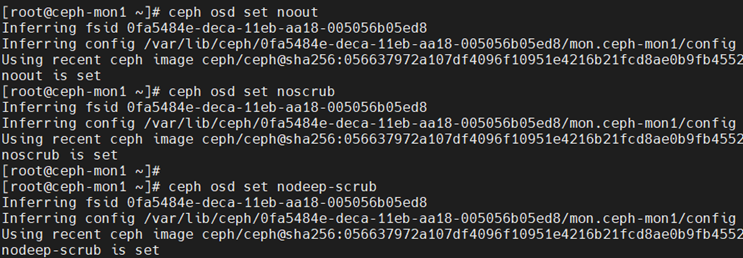
) {' T/ H2 {( h5 F4 i4 O设置集群标记,避免恢复过程中其他任务引发其他问题 ceph osd set noout ceph osd set noscrub ceph osd set nodeep-scrub [7 \! @& R, _3 {
! E4 A1 j/ _# T! f9 E
; g/ r0 r8 `' i) W. D3 _ceph osd set-full-ratio 0.96 (不能调太高,要不再次到阈值了就没得再调整了) ceph osd set-backfillfull-ratio 0.92 ceph osd set-nearfull-ratio 0.9
' C9 z" y9 k# ^" q# {7 c+ t1 J3 m6 w' r& _
ceph osd dump | grep full_ratio
! O4 D% T$ j! C: Y
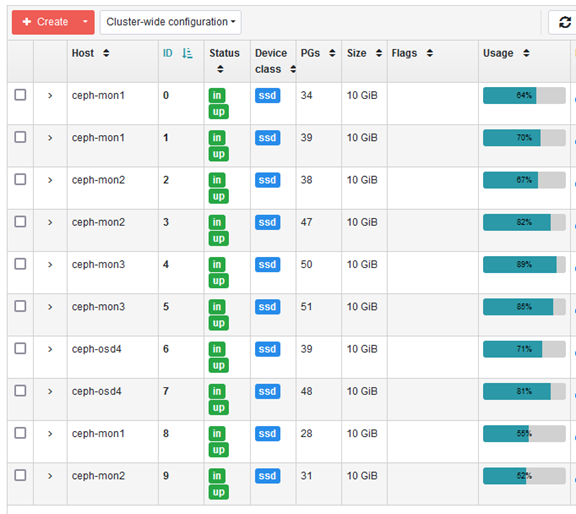
2 j$ u! O! g+ r9 A' O调整后,ceph显示Health OK 趁ceph临时可操作osd,赶紧整理删除没用的image数据或增加新的磁盘同步降低平均值。 cephadm shell -- ceph orch daemon add osd ceph-mon1:/dev/sdd cephadm shell -- ceph orch daemon add osd ceph-mon2:/dev/sdd
" S1 U' i) I/ j0 @/ L1 G u添加两磁盘后,使用率自动均衡降低了。
: X) [* I3 w) N1 v, F3 g正常后恢复为初始值 ceph osd set-full-ratio 0.95 ceph osd set-backfillfull-ratio 0.90 ceph osd set-nearfull-ratio 0.85 2 O; {! c! z2 M3 W" f# i4 Q2 z
最后解除OSD的禁止读写和群集标记 ceph osd unpause ceph osd unset noout ceph osd unset noscrub ceph osd unset nodeep-scrub 9 D) V2 e) w' {6 l! D- R! z6 o
, }# w8 [/ |7 ^! P$ e8 R( p* Z0 ]
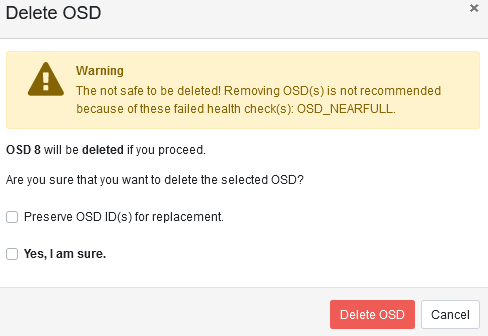
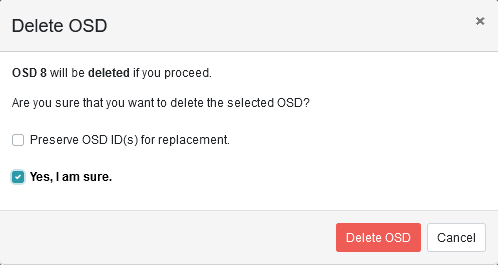
如果要删除OSD,需确保ceph是健康状态才操作。
' ^" c6 E7 g. x0 F/ N7 jHealth状态下无警告。 ' A' x, k& o9 q) q2 b7 w+ p. p8 G
9 F) Z* L$ W$ S: Z/ D
|





 发表于 2022-7-22 11:15:03