|
前言 本文先介绍一下VLAN Trunk的基本概念,以及OpenStack Neutron和OpenFlow based SDN是如何为Trunk port提供网络支持。OpenStack对VLAN Trunk的支持具体是什么?虽然OpenStack与容器,物理主机也做了集成,但是OpenStack最主要的应用还是虚机管理,而现代的操作系统,不论是Linux还是Windows,都支持将网卡配置成Trunk port。OpenStack对VLAN Trunk的支持就是指对OpenStack所管理的虚机的Trunk port,提供网络支持。
" M. s1 ~1 A! t9 E5 w! a5 C, ` : r- o3 H" @) O : r- o3 H" @) O
主机的Trunk port是指在主机的一块网卡上添加多个带有不同VLAN ID的子网卡。通过子网卡发送的数据,打上VLAN Tag,被发送出去。由于带了不同的VLAN Tag,子网卡可以认为连接在VLAN Tag标识的网络中。这样,不用增减主机的网卡,就可以将主机添加到新的网络中。更主要的是,这种方式的网络添加是动态的。 主机的Trunk port有什么用?一个应用是在NFV场景下,一个VNF(Virtual Networking Function)可能需要同时连接多个网络。当然最简单是一个网络对应一块网卡,但如果网络数量巨大,网卡数量也巨大,一方面这不现实。另一方面,连接的多个网络也是动态增减的,如果每次增减都插拔VNF的网卡,明显也是不能接受的。如果用Trunk port,当需要动态连接多个网络时,只需要动态的创建/删除相应的子网卡即可。( f4 ? M" X& s/ U# z+ g
VLAN Trunk在NFV中的应用 一、VLAN Trunk介绍1.1 VLAN简介VLAN(Virtual LAN)由IEEE802.1Q定义。要讲VLAN要先从广播域(Broadcast Domain)开始说起。在下图中,假设PC1-5在一个广播域中,当PC1发出广播帧,例如ARP,DHCP,由于目的MAC地址是广播地址,同一个广播域内的所有设备都将收到相应的广播帧。如果PC1-5在一个子网中,那这本身也无可厚非,因为这正是ARP,DHCP的工作原理。
9 e. Z* K3 Q1 A' }9 p' W6 R; o4 M , k3 d2 u7 K: E$ H) m) F u , k3 d2 u7 K: E$ H) m) F u
如果PC1-5不在一个子网中呢?例如上图中,PC1在橙色子网,PC2-3在绿色子网,PC4-5在红色子网。理论上,PC1发出的广播帧只应该在橙色子网内传播。但实际上,是由于PC1-5在一个广播域中,PC2-5还是会收到PC1的广播帧。虽然PC2-5会直接丢弃这个广播帧,但是这里存在安全问题和性能问题。首先,PC2-5虽然不会处理PC1发来的广播帧,但是数据还是发送过来了,通过侦听和伪装,可以达到劫持的目的,例如ARP spoof。其次,广播帧本来不用在整个网络传播,但现在就整个网络传播,这样占用了交换机的带宽,在大规模网络中,尤其会影响网络性能。解决这些问题的方法就是使用VLAN。 VLAN是一组网络端口的集合。实现了VLAN的交换机,会将二层的单播、组播、广播都局限在一个VLAN中,这样不同的VLAN中的主机,交换机就不会有其他VLAN的数据。只有交换机能看到VLAN,连接交换机的其他设备,例如Server、Router都感觉不到VLAN的存在。将不同的子网规划在不同的VLAN当中,可以实现子网的隔离。即使所有的设备都在一个交换机上,不同的VLAN之间通信也需要通过Router。
0 c' ]& {( X$ b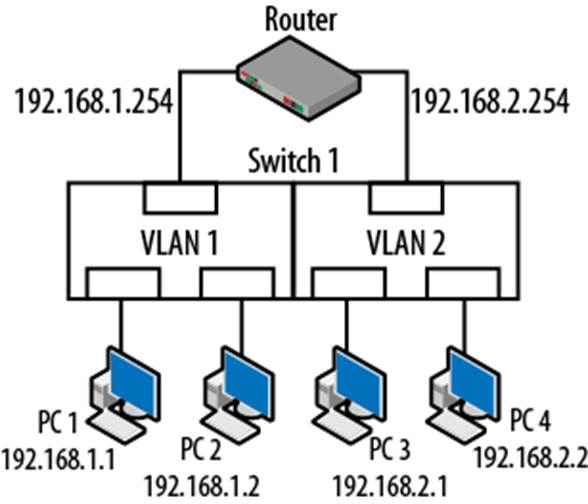 1.2 VLAN Trunk简介VLAN的划分并非只能在一个交换机上,多个交换机可以共同组成VLAN。那多个交换机上的VLAN是怎么连接到一起的?有两种方法。 第一种方法是把每个交换机上的每个VLAN都连在一起。如下图所示:5 v, H9 F# t# N, S# o
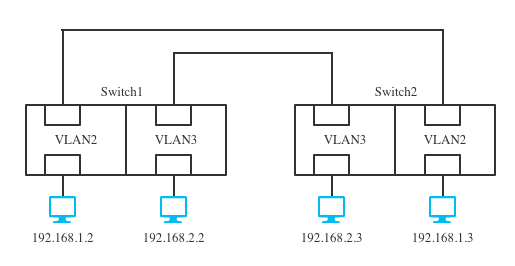
; z7 x( W+ g# k! Z; }图中有两个交换机,各有两个VLAN,为了让VLAN能正常工作,将VLAN1和VLAN2分别连接起来。如果是两个交换机,两个VLAN还好,如果是100个VLAN,那么这里需要有100条线路,200个交换机端口。这么连接可以吗?可以,只要有钱,因为这里的线路和交换机端口都是钱。这种方法,运维和成本支出比较大,不实用。 第二种方法是通过VLAN Trunk连接交换机。VLAN Trunk是一种网络设备间的point-to-point的连接。一条VLAN Trunk线路可以同时传输多个甚至所有的VLAN数据。
4 b! I, z& k$ h+ R x$ M, i O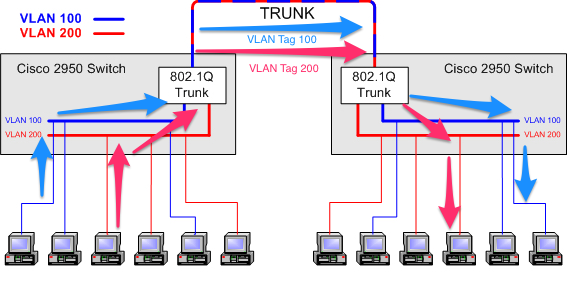
1 {3 k5 L0 j( [7 z由于VLAN Trunk可以传输多个VLAN数据,Ethernet Frame在VLAN Trunk上传输时,需要带上802.1Q定义的VLAN tag,这样交换机才能区分Ethernet Frame到底属于哪个VLAN。VLAN Trunk的具体使用过程如下: - 当最左侧服务器想要访问最右侧服务器,最左侧服务器将Ethernet Frame发送到左侧交换机
- 左侧交换机本地没有目的MAC对应的转发信息,因此Ethernet Frame发送到了左侧交换机的VLAN Trunk port
- 由于这是来自VLAN100的Ethernet Frame,交换机给Ethernet Frame打上VLAN 100的Tag,从自己的VLAN Trunk port发出,发送到右侧交换机的VLAN Trunk port
- 右侧的VLAN Trunk port收到VLAN 100的Ethernet Frame,去除VLAN Tag,再在本地的VLAN 100端口中查找MAC转发
- 找到对应的MAC/端口记录,最终Ethernet Frame发送到最右侧的服务器7 N+ q' b% A) {( [. d
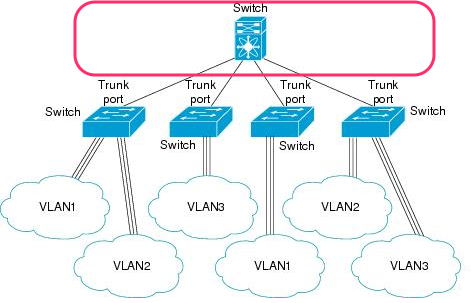
如果是VLAN200的数据,过程一样,只是VLAN Tag从100变成了200。 通过VLAN Trunk port,两个交换机之间不论需要连接多少个VLAN,只需要一个VLAN Trunk连接(一对Trunk port)即可。 如果有多个交换机需要连接,通常会用另外一个交换机连接它们,如下图所示,交换机之间都通过Trunk port相连。) N, m; k5 w0 |: w% a8 P' w
 ' t2 `& u& \* G5 S+ k ' t2 `& u& \* G5 S+ k
红色框内的交换机的4个port都是Trunk port,任意的VLAN 标签的Ethernet Frame都可以在这个交换机内传输。可以把红色框内看成是一个Trunk network,一个Trunk network可以传输带VLAN标签的Ethernet Frame。虽然图中只有一个交换机,但是Trunk network可以更加复杂,由多个交换机组成。多个VLAN的网络数据共同在Trunk network上传输,通过VLAN Tag来识别VLAN。 如果把上图中下面四个交换机换成主机(虚机),那就是OpenStack VLAN Trunk希望支持的场景。为了支持这个场景,需要为虚机提供一个Trunk Network。 1.3 Linux VLAN TrunkWindows也支持Trunk port,与Linux类似,这里只说明Linux系统下的Trunk port。 Linux系统可以通过内核模块8021q支持VLAN Trunk。这里有什么不一样?在一般情况下,主机是不感知VLAN Tag的,也就是说主机发送的网络数据都是不带VLAN Tag,所有VLAN Tag操作都是由交换机完成。但是实际上交换机也不知道自己连接的是什么,所以,如果在主机完成VLAN Tag的操作,再发送到交换机,交换机也能处理。基于这个前提,Linux能够将一块以太网卡配置成一个支持802.1q的Trunk port,使得这块网卡跟前面描述的交换机上的Trunk port一样,能够收发多个VLAN的网络数据包。并且通过配置Linux主机的子网卡,可以使得Linux主机内部完成VLAN Tag的操作(打上VLAN Tag,去除VLAN Tag)。有不止一种方法可以配置Linux VLAN Trunk,这里以ip命令为例,为eth0添加名为eth0.102的子网卡,其VLAN ID为102。 [color=rgb(51, 51, 51) !important]4 K4 H7 L U! ^$ [9 v
* H& t/ `2 X( o7 h7 Q, D) V
4 U' }" o; v$ B- v, d
7 x1 }. |9 _' v4 ?5 b
+ H0 {: R: H/ K
; D8 ?9 d5 F' Y6 L6 i/ R
7 m& `1 k1 r& o2 ]! r! `' F
: f& V: r2 s5 M- x) p# D) y" w
- V9 i; |* f" U- ]) x" ?- z6 v
5 u! ^, E( J' Z6 K1 {: T% Y5 B
[color=rgb(153, 153, 153) !important]Java
& Z4 f& C0 `4 h/ P& F
, s7 _2 H% T: h" _8 H- W6 ~. l5 j$ H1 Z9 q5 f- ?0 D
| [color=rgb(51, 51, 51) !important]$[color=rgb(0, 111, 224) !important] [color=rgb(0, 78, 208) !important]sudo [color=rgb(0, 78, 208) !important]ip [color=rgb(0, 78, 208) !important]link [color=rgb(0, 78, 208) !important]add [color=rgb(0, 78, 208) !important]link [color=rgb(0, 78, 208) !important]eth0 [color=rgb(0, 78, 208) !important]name [color=rgb(0, 45, 122) !important]eth0[color=rgb(51, 51, 51) !important].[color=rgb(206, 0, 0) !important]102[color=rgb(0, 111, 224) !important] [color=rgb(0, 78, 208) !important]type [color=rgb(0, 78, 208) !important]vlan [color=rgb(0, 0, 0) !important]id[color=rgb(0, 111, 224) !important] [color=rgb(206, 0, 0) !important]102
8 Z& k( c3 v- n% n$ n
( |+ V7 a& A% }0 M |
! v+ n o, X, z% ]6 ], _" @
就这么简单,之后可以看到一个新的网卡在系统的网卡列表中。Linux VLAN Trunk工作过程如下: - 外界传入的带VLAN Tag 102的包,到达了eth0,VLAN Tag 102被去除,然后不带VLAN Tag的Ethernet Frame被重新发往操作系统网络栈,再发送到eth0.102。
- 从eth0.102发送出来的帧,被打上VLAN102的标签,再从eth0传出。' x, H& `2 H9 F4 e$ y3 e
应用层面,收发的还是不带VLAN Tag的数据,只是经过Linux VLAN Trunk的处理,进出主机的的数据是带VLAN Tag的数据。 由于eth0配置成了VLAN Trunk port。为了让带有VLAN标签的Ethernet Frame能够在网络上传输。eth0所接入的网络必须是一个Trunk network。否则无法传输任意带VLAN Tag的Ethernet Frame。也就是说,需要将主机的Trunk port连接到红框内。接下来我们看看OpenStack是怎么做的。 二、OpenStack Neutron对VLAN Trunk的支持Neutron VLAN Transparency这是OpenStack Kilo版本的特性,由VLAN trunking networks for NFV定义。这个特性为Neutron network增加一个属性“vlan-transparent”,当vlan-transparent为True时,表明在这个Neutron network是一个Trunk network。在这个Neutron network中的虚机可以使用Linux VLAN Trunk功能。接下来看看Neutron为了实现这个特性做了什么? 什么也没做!Neutron只是提供了这么一个属性,具体的实现交给底层的SDN。如果SDN不支持VLAN Transparency,可以在ML2中告知Neutron。那么用户在创建Neutron network时,如果指定了vlan-transparent=True,Neutron会返回“Backend does not support VLAN Transparency.”。例如OpenVSwitch,就不支持VLAN Transparency。 所以,并非所有的SDN都支持这个功能,就算实现了,每种SDN的实现方式不一样。不过本质上,都是将SDN控制的vSwitch配置成Trunk模式。需要注意的是,vSwitch最终还是要连接到Physical Switch,所以Physical Switch相应的端口也需要配置成Trunk port。 先来看看VLAN Transparency的问题, - 不支持OpenVSwitch
- 要求Physical Switch也配置相应的Trunk port
3 A) h$ L9 ?" P0 E3 j( z
VLAN aware VMs在支持相同功能的前提下,解决了上面两个问题。首先看看如何使用VLAN aware VMs这个功能。Neutron VLAN aware VMs是OpenStack Newton版本的特性,由VLAN aware VMs定义。VLAN aware VMs和VLAN Transparency说的其实是一件事情,就是如何传递VM发出来的带VLAN Tag的帧。 2.1 实验步骤我用的是最新代码(Pike 2017-08-08)配合OpenVSwitch完成下面的操作。要使能VLAN aware VMs,只需要在/etc/neutron/neutron.conf中,在service_plugins后面加上trunk。 首先创建Trunk port所在的网络和VLAN子网卡所在的网络。 [color=rgb(51, 51, 51) !important]
5 I: X, \1 z8 B- D
4 ?' e- X% i4 f3 Z
# w* i# m0 I( ?" ?& S6 j
$ } s+ j# s I' C6 C- S
' L1 L9 R- V8 r s! H7 }0 Y
3 M. t/ Z' r8 g' \. {+ r. B# \8 e. a- i
* ?: s, _9 J1 h: s/ j5 C- p$ K! I& B0 ~( M0 y# x: m" C$ m
) s2 X7 ~# R6 `8 u3 o- S; y[color=rgb(153, 153, 153) !important]Java
: F1 ~4 K t$ Y8 [; }
) G$ i H/ N# Y' M5 N( V2 F# A; w% A# g# C1 f1 X" q
1
, E/ l$ W7 r2 f9 r[color=rgb(49, 124, 197) !important]2
" F8 M- d. N. \) G% s8 T/ m* s) z3
4 \% a7 W8 g s[color=rgb(49, 124, 197) !important]4
g7 j: `0 ^! I$ V- Z& t1 u
| [color=rgb(51, 51, 51) !important]$[color=rgb(0, 111, 224) !important] [color=rgb(0, 78, 208) !important]openstack [color=rgb(0, 78, 208) !important]network [color=rgb(0, 78, 208) !important]create [color=rgb(128, 0, 128) !important]parent[color=rgb(0, 111, 224) !important]-[color=rgb(0, 0, 0) !important]net
4 q% q7 k" U8 m+ ~- s[color=rgb(51, 51, 51) !important]$[color=rgb(0, 111, 224) !important] [color=rgb(0, 78, 208) !important]openstack [color=rgb(0, 78, 208) !important]subnet [color=rgb(0, 78, 208) !important]create [color=rgb(128, 0, 128) !important]parent[color=rgb(0, 111, 224) !important]-[color=rgb(0, 45, 122) !important]subnet[color=rgb(0, 111, 224) !important] [color=rgb(0, 111, 224) !important]--[color=rgb(0, 78, 208) !important]network [color=rgb(128, 0, 128) !important]parent[color=rgb(0, 111, 224) !important]-[color=rgb(0, 45, 122) !important]net[color=rgb(0, 111, 224) !important] [color=rgb(0, 111, 224) !important]--[color=rgb(0, 45, 122) !important]subnet[color=rgb(0, 111, 224) !important]-[color=rgb(0, 0, 0) !important]range[color=rgb(0, 111, 224) !important] [color=rgb(206, 0, 0) !important]20.0.0.0[color=rgb(0, 111, 224) !important]/[color=rgb(206, 0, 0) !important]24 0 `0 C& @# w8 M9 `5 Z
[color=rgb(51, 51, 51) !important]$[color=rgb(0, 111, 224) !important] [color=rgb(0, 78, 208) !important]openstack [color=rgb(0, 78, 208) !important]network [color=rgb(0, 78, 208) !important]create [color=rgb(0, 45, 122) !important]sub[color=rgb(0, 111, 224) !important]-[color=rgb(0, 0, 0) !important]net
7 E5 {8 T# W5 O% O4 h[color=rgb(51, 51, 51) !important]$[color=rgb(0, 111, 224) !important] [color=rgb(0, 78, 208) !important]openstack [color=rgb(0, 78, 208) !important]subnet [color=rgb(0, 78, 208) !important]create [color=rgb(0, 45, 122) !important]sub[color=rgb(0, 111, 224) !important]-[color=rgb(0, 45, 122) !important]subnet[color=rgb(0, 111, 224) !important] [color=rgb(0, 111, 224) !important]--[color=rgb(0, 78, 208) !important]network [color=rgb(0, 45, 122) !important]sub[color=rgb(0, 111, 224) !important]-[color=rgb(0, 45, 122) !important]net[color=rgb(0, 111, 224) !important] [color=rgb(0, 111, 224) !important]--[color=rgb(0, 45, 122) !important]subnet[color=rgb(0, 111, 224) !important]-[color=rgb(0, 0, 0) !important]range[color=rgb(0, 111, 224) !important] [color=rgb(206, 0, 0) !important]21.0.0.0[color=rgb(0, 111, 224) !important]/[color=rgb(206, 0, 0) !important]24
: t) G3 h, a. c4 W+ _% H' T
|
0 [' ~0 F p5 q$ y7 ~* ^& V _: R
; {+ k- }9 w$ _注意这里我并没有指定网络的类型,网络可以不用是VLAN的,像在我的环境中,网络就是VXLAN类型。为什么会这样?在后面会说。 接下来创建Trunk port和subport。 [color=rgb(51, 51, 51) !important]! R0 L# @$ S; J$ k: p v
. g( q$ D" I9 b: {& \7 r% Q& T4 u& T4 {1 W
" u0 s" j; J2 H8 v# e/ {/ u* s4 |, I! W- d$ L) f
+ X: d, t* L3 C7 h
q/ P% @, L" b, Z1 |' @& ]
1 O. v8 |5 V! d/ N) E. D+ v6 U1 t8 M; i" r
! [' Q: H' q1 O" g7 y/ o( T" X7 C[color=rgb(153, 153, 153) !important]Java
* {: H8 m. A% q3 C) X( W# ^# O* L# @+ a4 B
1 ! W! v0 d! ]9 z# \
[color=rgb(49, 124, 197) !important]2
8 ^# M- z2 I" q* B" ?# @3 S$ Q B3 4 ]$ B4 k, |7 G* h* k% i9 t
[color=rgb(49, 124, 197) !important]4
2 i# c5 D+ n0 x6 n: M/ M" r/ t5
3 f: r1 i) T/ g* s2 v[color=rgb(49, 124, 197) !important]6 ' s3 e8 @, y0 I n
7
' [! x% c" d. T0 G[color=rgb(49, 124, 197) !important]8 % ~' Z# ?( K$ D* H& b2 ^5 T: x
| [color=rgb(51, 51, 51) !important]$[color=rgb(0, 111, 224) !important] [color=rgb(0, 78, 208) !important]openstack [color=rgb(0, 78, 208) !important]port [color=rgb(0, 78, 208) !important]create [color=rgb(128, 0, 128) !important]parent[color=rgb(0, 111, 224) !important]-[color=rgb(0, 45, 122) !important]port1[color=rgb(0, 111, 224) !important] [color=rgb(0, 111, 224) !important]--[color=rgb(0, 78, 208) !important]network [color=rgb(128, 0, 128) !important]parent[color=rgb(0, 111, 224) !important]-[color=rgb(0, 0, 0) !important]net 7 I! a/ u4 r `8 [1 c5 D9 D
[color=rgb(51, 51, 51) !important]$[color=rgb(0, 111, 224) !important] [color=rgb(0, 78, 208) !important]openstack [color=rgb(0, 78, 208) !important]port [color=rgb(0, 78, 208) !important]create [color=rgb(0, 45, 122) !important]sub[color=rgb(0, 111, 224) !important]-[color=rgb(0, 45, 122) !important]port1[color=rgb(0, 111, 224) !important] [color=rgb(0, 111, 224) !important]--[color=rgb(0, 78, 208) !important]network [color=rgb(0, 45, 122) !important]sub[color=rgb(0, 111, 224) !important]-[color=rgb(0, 0, 0) !important]net 1 O: z; x- `- z* I, k
[color=rgb(51, 51, 51) !important]$[color=rgb(0, 111, 224) !important] [color=rgb(0, 78, 208) !important]openstack [color=rgb(0, 78, 208) !important]network [color=rgb(0, 78, 208) !important]trunk [color=rgb(0, 78, 208) !important]create [color=rgb(0, 45, 122) !important]trunk1[color=rgb(0, 111, 224) !important] [color=rgb(0, 111, 224) !important]--[color=rgb(128, 0, 128) !important]parent[color=rgb(0, 111, 224) !important]-[color=rgb(0, 78, 208) !important]port [color=rgb(128, 0, 128) !important]parent[color=rgb(0, 111, 224) !important]-[color=rgb(0, 0, 0) !important]port1 ) p4 T. u% e8 M& m$ p) _
[color=rgb(51, 51, 51) !important]$[color=rgb(0, 111, 224) !important] [color=rgb(0, 78, 208) !important]openstack [color=rgb(0, 78, 208) !important]network [color=rgb(0, 78, 208) !important]trunk [color=rgb(0, 78, 208) !important]set [color=rgb(0, 45, 122) !important]trunk1[color=rgb(0, 111, 224) !important] [color=rgb(0, 111, 224) !important]--[color=rgb(0, 78, 208) !important]subport [color=rgb(0, 45, 122) !important]port[color=rgb(0, 111, 224) !important]=[color=rgb(0, 45, 122) !important]sub[color=rgb(0, 111, 224) !important]-[color=rgb(0, 45, 122) !important]port1[color=rgb(51, 51, 51) !important],[color=rgb(0, 45, 122) !important]segmentation[color=rgb(0, 111, 224) !important]-[color=rgb(0, 45, 122) !important]type[color=rgb(0, 111, 224) !important]=[color=rgb(0, 45, 122) !important]vlan[color=rgb(51, 51, 51) !important],[color=rgb(0, 45, 122) !important]segmentation[color=rgb(0, 111, 224) !important]-[color=rgb(0, 45, 122) !important]id[color=rgb(0, 111, 224) !important]=[color=rgb(206, 0, 0) !important]102
- V+ o, K' a5 h$ x: b4 r[color=rgb(51, 51, 51) !important]$[color=rgb(0, 111, 224) !important] [color=rgb(0, 78, 208) !important]openstack [color=rgb(0, 78, 208) !important]port [color=rgb(0, 78, 208) !important]create [color=rgb(128, 0, 128) !important]parent[color=rgb(0, 111, 224) !important]-[color=rgb(0, 45, 122) !important]port2[color=rgb(0, 111, 224) !important] [color=rgb(0, 111, 224) !important]--[color=rgb(0, 78, 208) !important]network [color=rgb(128, 0, 128) !important]parent[color=rgb(0, 111, 224) !important]-[color=rgb(0, 0, 0) !important]net
, b- u2 `# w- Z1 @) q[color=rgb(51, 51, 51) !important]$[color=rgb(0, 111, 224) !important] [color=rgb(0, 78, 208) !important]openstack [color=rgb(0, 78, 208) !important]port [color=rgb(0, 78, 208) !important]create [color=rgb(0, 45, 122) !important]sub[color=rgb(0, 111, 224) !important]-[color=rgb(0, 45, 122) !important]port2[color=rgb(0, 111, 224) !important] [color=rgb(0, 111, 224) !important]--[color=rgb(0, 78, 208) !important]network [color=rgb(0, 45, 122) !important]sub[color=rgb(0, 111, 224) !important]-[color=rgb(0, 0, 0) !important]net
: M1 U. J+ ^8 e8 [6 t7 a[color=rgb(51, 51, 51) !important]$[color=rgb(0, 111, 224) !important] [color=rgb(0, 78, 208) !important]openstack [color=rgb(0, 78, 208) !important]network [color=rgb(0, 78, 208) !important]trunk [color=rgb(0, 78, 208) !important]create [color=rgb(0, 45, 122) !important]trunk2[color=rgb(0, 111, 224) !important] [color=rgb(0, 111, 224) !important]--[color=rgb(128, 0, 128) !important]parent[color=rgb(0, 111, 224) !important]-[color=rgb(0, 78, 208) !important]port [color=rgb(128, 0, 128) !important]parent[color=rgb(0, 111, 224) !important]-[color=rgb(0, 0, 0) !important]port2 ' b, _9 i5 X& e: q# K
[color=rgb(51, 51, 51) !important]$[color=rgb(0, 111, 224) !important] [color=rgb(0, 78, 208) !important]openstack [color=rgb(0, 78, 208) !important]network [color=rgb(0, 78, 208) !important]trunk [color=rgb(0, 78, 208) !important]set [color=rgb(0, 45, 122) !important]trunk2[color=rgb(0, 111, 224) !important] [color=rgb(0, 111, 224) !important]--[color=rgb(0, 78, 208) !important]subport [color=rgb(0, 45, 122) !important]port[color=rgb(0, 111, 224) !important]=[color=rgb(0, 45, 122) !important]sub[color=rgb(0, 111, 224) !important]-[color=rgb(0, 45, 122) !important]port2[color=rgb(51, 51, 51) !important],[color=rgb(0, 45, 122) !important]segmentation[color=rgb(0, 111, 224) !important]-[color=rgb(0, 45, 122) !important]type[color=rgb(0, 111, 224) !important]=[color=rgb(0, 45, 122) !important]vlan[color=rgb(51, 51, 51) !important],[color=rgb(0, 45, 122) !important]segmentation[color=rgb(0, 111, 224) !important]-[color=rgb(0, 45, 122) !important]id[color=rgb(0, 111, 224) !important]=[color=rgb(206, 0, 0) !important]102 4 M2 a8 n% v$ l$ o7 Y" \: `7 C }" w
|
% F6 M5 I z7 ~这里创建了两组4个port,并用trunk模型将它们关联起来了。除此之外,还为Trunk中的subport指定了segmentation-type和segmentation-id。VLAN是目前OpenVSwitch支持的唯一的segmentation type(也是大多数SDN唯一支持的类型),segmentation id就是在虚机中创建subport时指定的VLAN ID。 接下来用parent port创建两个虚机。 [color=rgb(51, 51, 51) !important]
8 L! s2 {. \/ d
0 t: V7 c9 P# J' D( _4 g9 U+ E( Z
$ z7 v( T5 L$ Z, i
, A+ j- C3 c4 n5 p
8 t2 Z) A2 A2 {9 t
# `/ u) t6 ~; k w
/ G3 V% j/ U& I$ b, T1 b1 G* n
. ^% S( e( L& Y
# E1 Z/ w* J8 E! p5 K9 E
. ?1 Q# h8 \, o$ d) v6 l
[color=rgb(153, 153, 153) !important]Java
E, a+ U; t2 Y4 n0 Q7 i! u
2 Y$ ^( x8 J) N* Z% [
9 ~* p/ u% f7 |6 m" `) q1
% \. N4 T- G2 `" H[color=rgb(49, 124, 197) !important]2
9 y& L5 q/ s& L
| [color=rgb(51, 51, 51) !important]$[color=rgb(0, 111, 224) !important] [color=rgb(0, 78, 208) !important]nova [color=rgb(0, 45, 122) !important]boot[color=rgb(0, 111, 224) !important] [color=rgb(0, 111, 224) !important]--[color=rgb(0, 78, 208) !important]image [color=rgb(0, 45, 122) !important]ubuntu[color=rgb(0, 111, 224) !important] [color=rgb(0, 111, 224) !important]--[color=rgb(0, 0, 0) !important]flavor[color=rgb(0, 111, 224) !important] [color=rgb(206, 0, 0) !important]2[color=rgb(0, 111, 224) !important] [color=rgb(0, 111, 224) !important]--[color=rgb(0, 78, 208) !important]nic [color=rgb(0, 45, 122) !important]port[color=rgb(0, 111, 224) !important]-[color=rgb(0, 45, 122) !important]id[color=rgb(0, 111, 224) !important]=[color=rgb(0, 111, 224) !important]<[color=rgb(128, 0, 128) !important]parent[color=rgb(0, 111, 224) !important]-[color=rgb(0, 78, 208) !important]port1 [color=rgb(0, 45, 122) !important]id[color=rgb(0, 111, 224) !important]>[color=rgb(0, 111, 224) !important] [color=rgb(0, 111, 224) !important]--[color=rgb(0, 45, 122) !important]key[color=rgb(0, 111, 224) !important]-[color=rgb(0, 45, 122) !important]name[color=rgb(0, 111, 224) !important]=[color=rgb(0, 111, 224) !important]<[color=rgb(0, 78, 208) !important]your [color=rgb(0, 78, 208) !important]key [color=rgb(0, 45, 122) !important]name[color=rgb(0, 111, 224) !important]>[color=rgb(0, 111, 224) !important] [color=rgb(0, 0, 0) !important]vm1
1 V, q. U& N" a( T[color=rgb(51, 51, 51) !important]$[color=rgb(0, 111, 224) !important] [color=rgb(0, 78, 208) !important]nova [color=rgb(0, 45, 122) !important]boot[color=rgb(0, 111, 224) !important] [color=rgb(0, 111, 224) !important]--[color=rgb(0, 78, 208) !important]image [color=rgb(0, 45, 122) !important]ubuntu[color=rgb(0, 111, 224) !important] [color=rgb(0, 111, 224) !important]--[color=rgb(0, 0, 0) !important]flavor[color=rgb(0, 111, 224) !important] [color=rgb(206, 0, 0) !important]2[color=rgb(0, 111, 224) !important] [color=rgb(0, 111, 224) !important]--[color=rgb(0, 78, 208) !important]nic [color=rgb(0, 45, 122) !important]port[color=rgb(0, 111, 224) !important]-[color=rgb(0, 45, 122) !important]id[color=rgb(0, 111, 224) !important]=[color=rgb(0, 111, 224) !important]<[color=rgb(128, 0, 128) !important]parent[color=rgb(0, 111, 224) !important]-[color=rgb(0, 78, 208) !important]port2 [color=rgb(0, 45, 122) !important]id[color=rgb(0, 111, 224) !important]>[color=rgb(0, 111, 224) !important] [color=rgb(0, 111, 224) !important]--[color=rgb(0, 45, 122) !important]key[color=rgb(0, 111, 224) !important]-[color=rgb(0, 45, 122) !important]name[color=rgb(0, 111, 224) !important]=[color=rgb(0, 111, 224) !important]<[color=rgb(0, 78, 208) !important]your [color=rgb(0, 78, 208) !important]key [color=rgb(0, 45, 122) !important]name[color=rgb(0, 111, 224) !important]>[color=rgb(0, 111, 224) !important] [color=rgb(0, 45, 122) !important]vm2 - W7 b7 W/ v4 k n; n9 u7 G
|
8 s% v0 L/ ]! G5 b/ U
; M0 N. V8 ~" ^/ _* K因为Linux VLAN Trunk需要8021q内核模块的支持,这里用了一个Ubuntu16.04的image。 到此为止,OpenStack的操作完成了。接下来,在两个虚机内部,配置Linux VLAN Trunk。在vm1内部,做如下配置: [color=rgb(51, 51, 51) !important]; X& j' \" \7 }; D
0 D# j7 E! H8 `: y( h/ O; F( R7 K. m
+ ], |: G9 m g' W! y( e* P
2 H% p4 I$ Z# W6 s3 M, j
# ?. y9 s4 }: d; I! ~0 e9 i
7 I7 t) B- S% |+ x
% y5 |6 @/ l- ]
2 y1 J+ X a9 d& H! H& _# s
2 y: G1 G* I+ B, o: J, R2 E6 R5 K7 X
+ ^, \7 O* [7 ?[color=rgb(153, 153, 153) !important]Java
1 k5 y2 s$ c. }* B1 s( l
, J% [4 ^; O3 O D7 W* H+ _6 Y; V" T6 H# G! X4 x
1 % r2 G1 B2 w* z- J- r0 F
[color=rgb(49, 124, 197) !important]2
" w9 H. ^ p9 ^. ~& U! z. M3
8 ^' o$ a( D2 u! K. I- z& k
+ k2 Q# M9 |5 d6 U0 H( g$ J1 B | [color=rgb(0, 45, 122) !important]ubuntu[color=rgb(102, 102, 102) !important]@vm1[color=rgb(0, 111, 224) !important]:[color=rgb(0, 111, 224) !important]~[color=rgb(51, 51, 51) !important]$[color=rgb(0, 111, 224) !important] [color=rgb(0, 78, 208) !important]sudo [color=rgb(0, 78, 208) !important]ip [color=rgb(0, 78, 208) !important]link [color=rgb(0, 78, 208) !important]add [color=rgb(0, 78, 208) !important]link [color=rgb(0, 78, 208) !important]ens3 [color=rgb(0, 78, 208) !important]name [color=rgb(0, 45, 122) !important]ens3[color=rgb(51, 51, 51) !important].[color=rgb(206, 0, 0) !important]102[color=rgb(0, 111, 224) !important] [color=rgb(0, 78, 208) !important]type [color=rgb(0, 78, 208) !important]vlan [color=rgb(0, 0, 0) !important]id[color=rgb(0, 111, 224) !important] [color=rgb(206, 0, 0) !important]102
& v* ?. e4 i3 q: d[color=rgb(0, 45, 122) !important]ubuntu[color=rgb(102, 102, 102) !important]@vm1[color=rgb(0, 111, 224) !important]:[color=rgb(0, 111, 224) !important]~[color=rgb(51, 51, 51) !important]$[color=rgb(0, 111, 224) !important] [color=rgb(0, 78, 208) !important]sudo [color=rgb(0, 78, 208) !important]ip [color=rgb(0, 78, 208) !important]link [color=rgb(0, 78, 208) !important]set [color=rgb(0, 78, 208) !important]dev [color=rgb(0, 45, 122) !important]ens3[color=rgb(51, 51, 51) !important].[color=rgb(206, 0, 0) !important]102[color=rgb(0, 111, 224) !important] [color=rgb(0, 78, 208) !important]address 3 k X0 M% i J: R; L, G B8 u
[color=rgb(0, 45, 122) !important]ubuntu[color=rgb(102, 102, 102) !important]@vm1[color=rgb(0, 111, 224) !important]:[color=rgb(0, 111, 224) !important]~[color=rgb(51, 51, 51) !important]$[color=rgb(0, 111, 224) !important] [color=rgb(0, 78, 208) !important]sudo [color=rgb(0, 78, 208) !important]ip [color=rgb(0, 78, 208) !important]link [color=rgb(0, 78, 208) !important]set [color=rgb(0, 78, 208) !important]dev [color=rgb(0, 45, 122) !important]ens3[color=rgb(51, 51, 51) !important].[color=rgb(206, 0, 0) !important]102[color=rgb(0, 111, 224) !important] [color=rgb(0, 45, 122) !important]up
' g. \3 E- |. V ~1 o
2 X: j7 H, ?3 g' I2 i3 x) i1 U. G4 D9 W |
% ]* q9 K/ `- a4 E
4 |2 M) \5 Z% h7 b这里给虚机的subport配置的VLAN ID是102,这是之前通过OpenStack命令创建Trunk时指定的segmentation-id。这里的ens3.102对应之前创建的sub-port1,为了让ens3.102能使用Neutron DHCP服务,这里将Neutron分配给sub-port1的MAC地址配置在ens3.102上。Linux子网卡默认会跟父网卡用同一个MAC地址,所以也可以在用OpenStack命令创建subport的时候,指定MAC地址。总之,这里我们让虚机内的子网卡的MAC地址与OpenStack Neutron中对应的subport的MAC地址一致。 在vm2内部做同样的操作,只是MAC地址换成成sub-port2的MAC地址。 2.2 验证连通性及DHCP服务DHCP服务
5 f9 H4 C! n% O8 r& H在两个虚机内部,通过dhclient命令获取子网卡IP地址。 [color=rgb(51, 51, 51) !important]$ r! u7 B. B* D) N0 v
( z/ w* i7 F, J$ J; Q( E
} k6 v8 `7 d$ [9 U6 W
( Y& @! b- O# D! J6 `! ^; S i }8 h f9 d
8 z) _: n$ L; C; m3 b/ B
9 C3 s, x' I2 l$ \5 A4 k, n4 n
6 z/ [$ @& G1 S+ ?3 \. o
6 R; s! d% s5 w; m6 c7 U- L/ ?* v4 f @- C+ [9 \! O
. F5 h; ]! _( y- X0 `' [5 ~[color=rgb(153, 153, 153) !important]Java
6 h1 ~% i/ i; n& V- K) U) J
% h8 {% }! p' I. R1 ( Z P2 c' O$ B6 S3 K
[color=rgb(49, 124, 197) !important]2 % e5 |$ W1 P+ M5 h9 [4 {! ^0 K
3 4 L4 D) W7 E$ k: _2 ^
[color=rgb(49, 124, 197) !important]4 : D5 n, f, P) i; N
5
) O" r* v! J ?( J% y! f6 x[color=rgb(49, 124, 197) !important]6
6 C# d( u5 v2 t# D
' Q l" `+ L( h+ N6 L2 e5 f | [color=rgb(0, 45, 122) !important]ubuntu[color=rgb(102, 102, 102) !important]@vm1[color=rgb(0, 111, 224) !important]:[color=rgb(0, 111, 224) !important]~[color=rgb(51, 51, 51) !important]$[color=rgb(0, 111, 224) !important] [color=rgb(0, 78, 208) !important]sudo [color=rgb(0, 45, 122) !important]dhclient[color=rgb(0, 111, 224) !important] [color=rgb(0, 111, 224) !important]-[color=rgb(0, 0, 0) !important]v[color=rgb(0, 111, 224) !important] [color=rgb(0, 45, 122) !important]ens3[color=rgb(51, 51, 51) !important].[color=rgb(206, 0, 0) !important]102[color=rgb(0, 111, 224) !important]
" J& Y) c7 v2 U' A2 Z/ r& S[color=rgb(0, 78, 208) !important]DHCPDISCOVER [color=rgb(0, 78, 208) !important]on [color=rgb(0, 45, 122) !important]ens3[color=rgb(51, 51, 51) !important].[color=rgb(206, 0, 0) !important]102[color=rgb(0, 111, 224) !important] [color=rgb(128, 0, 128) !important]to[color=rgb(0, 111, 224) !important] [color=rgb(206, 0, 0) !important]255.255.255.255[color=rgb(0, 111, 224) !important] [color=rgb(0, 0, 0) !important]port[color=rgb(0, 111, 224) !important] [color=rgb(206, 0, 0) !important]67[color=rgb(0, 111, 224) !important] [color=rgb(0, 0, 0) !important]interval[color=rgb(0, 111, 224) !important] [color=rgb(206, 0, 0) !important]3[color=rgb(0, 111, 224) !important] [color=rgb(51, 51, 51) !important]([color=rgb(0, 45, 122) !important]xid[color=rgb(0, 111, 224) !important]=[color=rgb(206, 0, 0) !important]0x8e2bc124[color=rgb(51, 51, 51) !important])
: c6 [/ E* O- z& U" M! K$ V/ ^[color=rgb(0, 78, 208) !important]DHCPREQUEST [color=rgb(0, 0, 0) !important]of[color=rgb(0, 111, 224) !important] [color=rgb(206, 0, 0) !important]21.0.0.6[color=rgb(0, 111, 224) !important] [color=rgb(0, 78, 208) !important]on [color=rgb(0, 45, 122) !important]ens3[color=rgb(51, 51, 51) !important].[color=rgb(206, 0, 0) !important]102[color=rgb(0, 111, 224) !important] [color=rgb(128, 0, 128) !important]to[color=rgb(0, 111, 224) !important] [color=rgb(206, 0, 0) !important]255.255.255.255[color=rgb(0, 111, 224) !important] [color=rgb(0, 0, 0) !important]port[color=rgb(0, 111, 224) !important] [color=rgb(206, 0, 0) !important]67[color=rgb(0, 111, 224) !important] [color=rgb(51, 51, 51) !important]([color=rgb(0, 45, 122) !important]xid[color=rgb(0, 111, 224) !important]=[color=rgb(206, 0, 0) !important]0x24c12b8e[color=rgb(51, 51, 51) !important])
, ^* B5 R+ ?' \( {( z[color=rgb(0, 78, 208) !important]DHCPOFFER [color=rgb(0, 0, 0) !important]of[color=rgb(0, 111, 224) !important] [color=rgb(206, 0, 0) !important]21.0.0.6[color=rgb(0, 111, 224) !important] [color=rgb(0, 0, 0) !important]from[color=rgb(0, 111, 224) !important] [color=rgb(206, 0, 0) !important]21.0.0.2
2 o0 A8 y. p- ^[color=rgb(0, 78, 208) !important]DHCPACK [color=rgb(0, 0, 0) !important]of[color=rgb(0, 111, 224) !important] [color=rgb(206, 0, 0) !important]21.0.0.6[color=rgb(0, 111, 224) !important] [color=rgb(0, 0, 0) !important]from[color=rgb(0, 111, 224) !important] [color=rgb(206, 0, 0) !important]21.0.0.2
5 ^2 L) T% W( [4 V6 q: N[color=rgb(0, 78, 208) !important]bound [color=rgb(128, 0, 128) !important]to[color=rgb(0, 111, 224) !important] [color=rgb(206, 0, 0) !important]21.0.0.6[color=rgb(0, 111, 224) !important] [color=rgb(0, 111, 224) !important]--[color=rgb(0, 111, 224) !important] [color=rgb(0, 78, 208) !important]renewal [color=rgb(128, 0, 128) !important]in[color=rgb(0, 111, 224) !important] [color=rgb(206, 0, 0) !important]42323[color=rgb(0, 111, 224) !important] [color=rgb(0, 45, 122) !important]seconds[color=rgb(51, 51, 51) !important]. $ f; b% ]. W9 F9 S) J/ ]5 H
( [/ I. K5 t) k+ o/ f8 g |
可以看到,子网卡也可以通过Neutron的DHCP服务获取IP地址。
, D, S6 \. i& j. XVLAN互通
: ]) Y3 Z' r6 }0 f( G0 k在vm1内部,ping vm2. [color=rgb(51, 51, 51) !important]$ a" w4 Q8 F" l
/ v( Y! G4 L7 \2 o
$ S0 n* T. c- ] m0 ?
3 E4 [" V( @" T
2 c- M9 J9 A; N0 j7 H6 V
& R/ I" e/ ~+ {8 O. V z: B
: \+ L2 x+ [# U$ G: }! U& g
1 E0 x$ n! D$ G( Z
$ p- d* f! F" e1 H' k* G) X+ \
% a2 M4 x" {! A# ]: c! G$ @2 }( M0 X
[color=rgb(153, 153, 153) !important]Java
' i/ V+ d* A2 f2 J, p" v' h+ U; Y
8 O" a- z) H+ f* D$ B2 t R" l; E7 g! p2 k( p# k& Q
1
' }! j8 Y; r1 z0 y( F. r" z) e9 W5 _[color=rgb(49, 124, 197) !important]2 % q ^) B% z% O3 y) M- `2 _: {* C7 G
3
- m g' s6 }! r0 ~) m[color=rgb(49, 124, 197) !important]4 # Z2 ?; M. T, O5 m+ I# e ]
5
5 j2 G; T& ~8 D5 ~/ K9 q \3 U
| [color=rgb(0, 45, 122) !important]ubuntu[color=rgb(102, 102, 102) !important]@vm1[color=rgb(0, 111, 224) !important]:[color=rgb(0, 111, 224) !important]~[color=rgb(51, 51, 51) !important]$[color=rgb(0, 111, 224) !important] [color=rgb(0, 0, 0) !important]ping[color=rgb(0, 111, 224) !important] [color=rgb(206, 0, 0) !important]21.0.0.7 7 P* p/ B: `3 F- Y; j, G" q2 {
[color=rgb(0, 0, 0) !important]PING[color=rgb(0, 111, 224) !important] [color=rgb(206, 0, 0) !important]21.0.0.7[color=rgb(0, 111, 224) !important] [color=rgb(51, 51, 51) !important]([color=rgb(206, 0, 0) !important]21.0.0.7[color=rgb(51, 51, 51) !important])[color=rgb(0, 111, 224) !important] [color=rgb(206, 0, 0) !important]56[color=rgb(51, 51, 51) !important]([color=rgb(206, 0, 0) !important]84[color=rgb(51, 51, 51) !important])[color=rgb(0, 111, 224) !important] [color=rgb(0, 78, 208) !important]bytes [color=rgb(0, 78, 208) !important]of [color=rgb(0, 45, 122) !important]data[color=rgb(51, 51, 51) !important]. 3 D4 S9 R% S* t6 g8 h. {
[color=rgb(206, 0, 0) !important]64[color=rgb(0, 111, 224) !important] [color=rgb(0, 78, 208) !important]bytes [color=rgb(0, 0, 0) !important]from[color=rgb(0, 111, 224) !important] [color=rgb(206, 0, 0) !important]21.0.0.7[color=rgb(0, 111, 224) !important]:[color=rgb(0, 111, 224) !important] [color=rgb(0, 45, 122) !important]icmp_seq[color=rgb(0, 111, 224) !important]=[color=rgb(206, 0, 0) !important]1[color=rgb(0, 111, 224) !important] [color=rgb(0, 45, 122) !important]ttl[color=rgb(0, 111, 224) !important]=[color=rgb(206, 0, 0) !important]64[color=rgb(0, 111, 224) !important] [color=rgb(0, 45, 122) !important]time[color=rgb(0, 111, 224) !important]=[color=rgb(206, 0, 0) !important]10.2[color=rgb(0, 111, 224) !important] [color=rgb(0, 0, 0) !important]ms ; o7 V. f+ x6 R) E
[color=rgb(206, 0, 0) !important]64[color=rgb(0, 111, 224) !important] [color=rgb(0, 78, 208) !important]bytes [color=rgb(0, 0, 0) !important]from[color=rgb(0, 111, 224) !important] [color=rgb(206, 0, 0) !important]21.0.0.7[color=rgb(0, 111, 224) !important]:[color=rgb(0, 111, 224) !important] [color=rgb(0, 45, 122) !important]icmp_seq[color=rgb(0, 111, 224) !important]=[color=rgb(206, 0, 0) !important]2[color=rgb(0, 111, 224) !important] [color=rgb(0, 45, 122) !important]ttl[color=rgb(0, 111, 224) !important]=[color=rgb(206, 0, 0) !important]64[color=rgb(0, 111, 224) !important] [color=rgb(0, 45, 122) !important]time[color=rgb(0, 111, 224) !important]=[color=rgb(206, 0, 0) !important]0.979[color=rgb(0, 111, 224) !important] [color=rgb(0, 0, 0) !important]ms
7 i5 U/ Z% v5 [7 P( C+ m[color=rgb(206, 0, 0) !important]64[color=rgb(0, 111, 224) !important] [color=rgb(0, 78, 208) !important]bytes [color=rgb(0, 0, 0) !important]from[color=rgb(0, 111, 224) !important] [color=rgb(206, 0, 0) !important]21.0.0.7[color=rgb(0, 111, 224) !important]:[color=rgb(0, 111, 224) !important] [color=rgb(0, 45, 122) !important]icmp_seq[color=rgb(0, 111, 224) !important]=[color=rgb(206, 0, 0) !important]3[color=rgb(0, 111, 224) !important] [color=rgb(0, 45, 122) !important]ttl[color=rgb(0, 111, 224) !important]=[color=rgb(206, 0, 0) !important]64[color=rgb(0, 111, 224) !important] [color=rgb(0, 45, 122) !important]time[color=rgb(0, 111, 224) !important]=[color=rgb(206, 0, 0) !important]0.817[color=rgb(0, 111, 224) !important] [color=rgb(0, 45, 122) !important]ms 6 v6 w" {/ u/ r
( B2 R" ]3 h5 z% c7 g$ ~4 O! J |
9 _1 `9 [- h: M/ L5 }在vm2内部,查看收到的包。前面讲过Linux VLAN Trunk的工作过程,Ethernet Frame发送到ens3.102时,已经剥离了VLAN标签。为了查看VLAN信息,所以我们这里直接监听ens3 [color=rgb(51, 51, 51) !important]- U: O* k' `& s4 F# ~" |% a0 U
$ ~: Z# `2 x0 ~9 j. V2 l
) ~$ Z1 I6 e% L$ l6 m% G$ r: Z
- w# g) ^4 u( t
0 a% R3 q7 [7 g; V( Y
3 a+ ]7 P6 f& s; B( ]& {
; l Y5 R! B) P! ^$ G' _
: }: m$ V" H3 l# B) h
+ {$ R) y- }( ^. j4 r
( [, i _! G! d[color=rgb(153, 153, 153) !important]Java
& M2 J6 d9 W% E1 e1 U1 A
+ i8 G E* ]' {2 k
1 ; \) E" S V' h* E) n/ w( a
[color=rgb(49, 124, 197) !important]2
6 ]7 R _% s, _8 f3 # F) B9 w! I; d4 w3 X6 M9 x% J
. y$ S* M9 g+ R6 ]/ L | [color=rgb(0, 45, 122) !important]ubuntu[color=rgb(102, 102, 102) !important]@vm2[color=rgb(0, 111, 224) !important]:[color=rgb(0, 111, 224) !important]~[color=rgb(51, 51, 51) !important]$[color=rgb(0, 111, 224) !important] [color=rgb(0, 78, 208) !important]sudo [color=rgb(0, 45, 122) !important]tcpdump[color=rgb(0, 111, 224) !important] [color=rgb(0, 111, 224) !important]-[color=rgb(0, 78, 208) !important]nei [color=rgb(0, 78, 208) !important]ens3 [color=rgb(0, 0, 0) !important]icmp
# ^% h& g/ o9 f; p7 i: u* T" J* P[color=rgb(206, 0, 0) !important]08[color=rgb(0, 111, 224) !important]:[color=rgb(206, 0, 0) !important]42[color=rgb(0, 111, 224) !important]:[color=rgb(206, 0, 0) !important]24.256617[color=rgb(0, 111, 224) !important] [color=rgb(0, 45, 122) !important]fa[color=rgb(0, 111, 224) !important]:[color=rgb(206, 0, 0) !important]16[color=rgb(0, 111, 224) !important]:[color=rgb(206, 0, 0) !important]3e[color=rgb(0, 111, 224) !important]:[color=rgb(206, 0, 0) !important]61[color=rgb(0, 111, 224) !important]:[color=rgb(206, 0, 0) !important]62[color=rgb(0, 111, 224) !important]:[color=rgb(0, 45, 122) !important]fa[color=rgb(0, 111, 224) !important] [color=rgb(0, 111, 224) !important]>[color=rgb(0, 111, 224) !important] [color=rgb(0, 45, 122) !important]fa[color=rgb(0, 111, 224) !important]:[color=rgb(206, 0, 0) !important]16[color=rgb(0, 111, 224) !important]:[color=rgb(206, 0, 0) !important]3e[color=rgb(0, 111, 224) !important]:[color=rgb(0, 45, 122) !important]da[color=rgb(0, 111, 224) !important]:[color=rgb(206, 0, 0) !important]61[color=rgb(0, 111, 224) !important]:[color=rgb(206, 0, 0) !important]99[color=rgb(51, 51, 51) !important],[color=rgb(0, 111, 224) !important] [color=rgb(0, 0, 0) !important]ethertype[color=rgb(0, 111, 224) !important] [color=rgb(206, 0, 0) !important]802.1Q[color=rgb(0, 111, 224) !important] [color=rgb(51, 51, 51) !important]([color=rgb(206, 0, 0) !important]0x8100[color=rgb(51, 51, 51) !important])[color=rgb(51, 51, 51) !important],[color=rgb(0, 111, 224) !important] [color=rgb(0, 0, 0) !important]length[color=rgb(0, 111, 224) !important] [color=rgb(206, 0, 0) !important]102[color=rgb(0, 111, 224) !important]:[color=rgb(0, 111, 224) !important] [color=rgb(0, 0, 0) !important]vlan[color=rgb(0, 111, 224) !important] [color=rgb(206, 0, 0) !important]102[color=rgb(51, 51, 51) !important],[color=rgb(0, 111, 224) !important] [color=rgb(0, 0, 0) !important]p[color=rgb(0, 111, 224) !important] [color=rgb(206, 0, 0) !important]0[color=rgb(51, 51, 51) !important],[color=rgb(0, 111, 224) !important] [color=rgb(0, 78, 208) !important]ethertype [color=rgb(0, 45, 122) !important]IPv4[color=rgb(51, 51, 51) !important],[color=rgb(0, 111, 224) !important] [color=rgb(206, 0, 0) !important]21.0.0.6[color=rgb(0, 111, 224) !important] [color=rgb(0, 111, 224) !important]>[color=rgb(0, 111, 224) !important] [color=rgb(206, 0, 0) !important]21.0.0.7[color=rgb(0, 111, 224) !important]:[color=rgb(0, 111, 224) !important] [color=rgb(0, 78, 208) !important]ICMP [color=rgb(0, 78, 208) !important]echo [color=rgb(0, 45, 122) !important]request[color=rgb(51, 51, 51) !important],[color=rgb(0, 111, 224) !important] [color=rgb(0, 0, 0) !important]id[color=rgb(0, 111, 224) !important] [color=rgb(206, 0, 0) !important]11731[color=rgb(51, 51, 51) !important],[color=rgb(0, 111, 224) !important] [color=rgb(0, 0, 0) !important]seq[color=rgb(0, 111, 224) !important] [color=rgb(206, 0, 0) !important]388[color=rgb(51, 51, 51) !important],[color=rgb(0, 111, 224) !important] [color=rgb(0, 0, 0) !important]length[color=rgb(0, 111, 224) !important] [color=rgb(206, 0, 0) !important]64[color=rgb(0, 111, 224) !important] 0 H9 X" W: b& c1 w9 c
[color=rgb(206, 0, 0) !important]08[color=rgb(0, 111, 224) !important]:[color=rgb(206, 0, 0) !important]42[color=rgb(0, 111, 224) !important]:[color=rgb(206, 0, 0) !important]25.258424[color=rgb(0, 111, 224) !important] [color=rgb(0, 45, 122) !important]fa[color=rgb(0, 111, 224) !important]:[color=rgb(206, 0, 0) !important]16[color=rgb(0, 111, 224) !important]:[color=rgb(206, 0, 0) !important]3e[color=rgb(0, 111, 224) !important]:[color=rgb(206, 0, 0) !important]61[color=rgb(0, 111, 224) !important]:[color=rgb(206, 0, 0) !important]62[color=rgb(0, 111, 224) !important]:[color=rgb(0, 45, 122) !important]fa[color=rgb(0, 111, 224) !important] [color=rgb(0, 111, 224) !important]>[color=rgb(0, 111, 224) !important] [color=rgb(0, 45, 122) !important]fa[color=rgb(0, 111, 224) !important]:[color=rgb(206, 0, 0) !important]16[color=rgb(0, 111, 224) !important]:[color=rgb(206, 0, 0) !important]3e[color=rgb(0, 111, 224) !important]:[color=rgb(0, 45, 122) !important]da[color=rgb(0, 111, 224) !important]:[color=rgb(206, 0, 0) !important]61[color=rgb(0, 111, 224) !important]:[color=rgb(206, 0, 0) !important]99[color=rgb(51, 51, 51) !important],[color=rgb(0, 111, 224) !important] [color=rgb(0, 0, 0) !important]ethertype[color=rgb(0, 111, 224) !important] [color=rgb(206, 0, 0) !important]802.1Q[color=rgb(0, 111, 224) !important] [color=rgb(51, 51, 51) !important]([color=rgb(206, 0, 0) !important]0x8100[color=rgb(51, 51, 51) !important])[color=rgb(51, 51, 51) !important],[color=rgb(0, 111, 224) !important] [color=rgb(0, 0, 0) !important]length[color=rgb(0, 111, 224) !important] [color=rgb(206, 0, 0) !important]102[color=rgb(0, 111, 224) !important]:[color=rgb(0, 111, 224) !important] [color=rgb(0, 0, 0) !important]vlan[color=rgb(0, 111, 224) !important] [color=rgb(206, 0, 0) !important]102[color=rgb(51, 51, 51) !important],[color=rgb(0, 111, 224) !important] [color=rgb(0, 0, 0) !important]p[color=rgb(0, 111, 224) !important] [color=rgb(206, 0, 0) !important]0[color=rgb(51, 51, 51) !important],[color=rgb(0, 111, 224) !important] [color=rgb(0, 78, 208) !important]ethertype [color=rgb(0, 45, 122) !important]IPv4[color=rgb(51, 51, 51) !important],[color=rgb(0, 111, 224) !important] [color=rgb(206, 0, 0) !important]21.0.0.6[color=rgb(0, 111, 224) !important] [color=rgb(0, 111, 224) !important]>[color=rgb(0, 111, 224) !important] [color=rgb(206, 0, 0) !important]21.0.0.7[color=rgb(0, 111, 224) !important]:[color=rgb(0, 111, 224) !important] [color=rgb(0, 78, 208) !important]ICMP [color=rgb(0, 78, 208) !important]echo [color=rgb(0, 45, 122) !important]request[color=rgb(51, 51, 51) !important],[color=rgb(0, 111, 224) !important] [color=rgb(0, 0, 0) !important]id[color=rgb(0, 111, 224) !important] [color=rgb(206, 0, 0) !important]11731[color=rgb(51, 51, 51) !important],[color=rgb(0, 111, 224) !important] [color=rgb(0, 0, 0) !important]seq[color=rgb(0, 111, 224) !important] [color=rgb(206, 0, 0) !important]389[color=rgb(51, 51, 51) !important],[color=rgb(0, 111, 224) !important] [color=rgb(0, 0, 0) !important]length[color=rgb(0, 111, 224) !important] [color=rgb(206, 0, 0) !important]64
+ V8 k' ~' K. V, N" e2 l* u# X
|
) x8 G, L3 F$ U, m
4 S8 _7 u& |7 s可以看到,vm2收到的原始Ethernet Frame是带VLAN Tag的。 2.3 原理注:这部分内容假设你对OpenStack Neutron已经有一定的了解了。5 }8 `' j8 D) M: |
虽然上面完成了VLAN aware VMs的配置和Linux VLAN Trunk的验证,甚至虚机内的subport都可以使用Neutron的DHCP服务,但是这里留下了两个问题没有解答。 - 首先,不用在vSwitch和Physical switch上打开trunk模式,就能支持带VLAN Tag的帧的传递,这中间发生了什么?
- 其次,一个传输VLAN数据的subport如何能使用定义在VXLAN网络中的DHCP服务?8 F0 `( ]+ V r) N
看完Neutron VLAN aware VMs的架构,这两个问题自然就能解决。首先我们看看计算节点上的OpenVSwitch网桥。可以发现,对每个Trunk port,对应的新增了一个网桥。
6 z& f. `$ J! J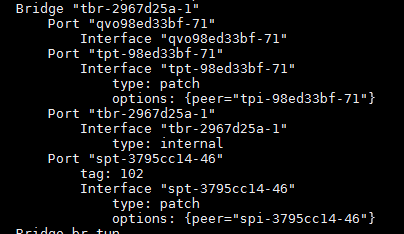 6 K( B5 t0 N1 I! h 6 K( B5 t0 N1 I! h
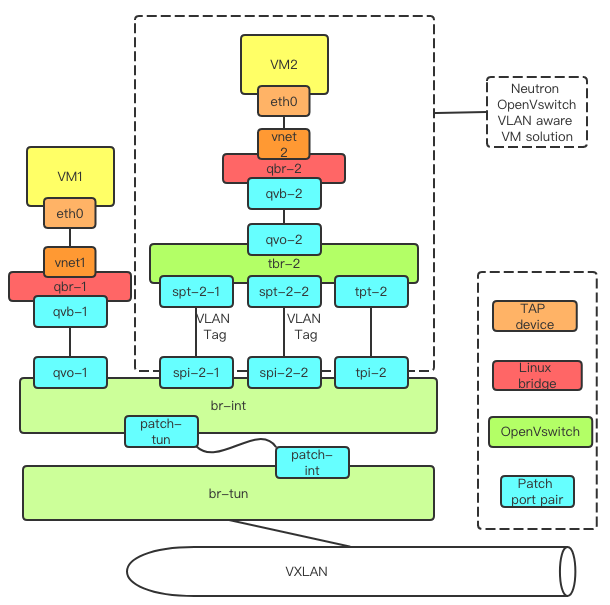
在这个网桥的端口中,qvo端口是用来连接虚机的,剩下的端口中,一个是bridge对应的端口,剩下两个都是patch port。其中一个还带了VLAN Tag 102,正是我们配置的segmentation-id。patch port都是成对出现,这里的patch port peer都挂在br-int上。具体的网桥和端口的关系如下图所示:' E' r" X2 F \- p: Z
 ' m' M4 l, ^) K& }5 E+ U! o ' m' M4 l, ^) K& }5 E+ U! o
左上角是正常的OpenVSwitch上连接的虚机,为什么不是虚机直接到OpenVSwitch网桥?这是历史遗留问题,这里不做解释,大家只需要知道qvo是br-int上用来连接虚机的端口。再看虚线框内,上半部分与原来虚机伸出的部分相同,下半部分就是之前展示的新增的网桥。网桥向上通过qvo连接虚机。向下通过patch port pair 连接parent port,从虚机出来的不带VLAN Tag的帧,从这对patch port走到br-int。同时向下通过patch port pair 连接subport,一个subport对应一对spt-spi,注意的是每个spt都带有相应的VLAN Tag,根据OVS的特性,所有从虚机出来的,带上相应VLAN Tag的帧都会发送到相应的spt,再通过spi发送到br-int。 所以,从虚机出来的Ethernet Frame,根据所携带的VLAN Tag(或者不带VLAN Tag),在tbr网桥上,可以分配到不同的patch port,进而转发到br-int上的不同端口。也就是说,在tbr上,从虚机里一块网卡发出来的Ethernet Frame被分流了。 在br-int上,其实不知道qvo、spi,tpi有什么区别,这些端口对于br-int来说地位是一样的。这些端口分别在不同的网络中(最开始为parent port和subport分别创建了网络),br-int根据端口所在的网络,将虚机发出来的Ethernet Frame打上Local network ID(又一个VLAN ID,类似于VTEP中VLAN ID与VXLAN ID对应中的VLAN),发往br-tun。在br-tun根据Local network ID转换成VXLAN数据发送出去。 在对端,经过br-tun发送到br-int,br-int根据不同的网络,将数据发送到相应的qvo,spi,tpi。这里看spi这条线路,因为patch port的相连,数据发送到了tbr网桥,再经由qvo发向虚机。由于qvo没有自己的VLAN Tag,所以它将保留入口端口的VLAN Tag,也就是VLAN 102,最后VLAN 102的帧发送给虚机。 总结一下Ethernet Frame的处理流程。从虚机发出来的VLAN数据,在tbr网桥通过相应的patch port 对,发送到br-int。在patch port对的传递过程中,VLAN Tag由虚机内定义的VLAN ID变成了br-int内部的Local network ID。br-int将数据发送给br-tun。br-tun根据自身记录的VLAN ID与VXLAN ID的对应,将VLAN数据中VLAN Tag去除,并将剩余的Ethernet Frame封装成VXLAN数据,在VXLAN tunnel上传输。 对端收到VXLAN数据,在br-tun转换成VLAN数据,VLAN Tag是Local network ID,再发送给br-int。br-int根据Local network ID和目的MAC地址,将VLAN数据从对应的端口(spi)发出。经过patch port 对的传输,VLAN Tag由Local network ID变成了spt上的VLAN Tag,最后通过qvo发送给虚机。虚机收到还是VLAN 102的数据,但是数据在中间是通过VXLAN网络传输。 所以为什么不需要vSwitch和Physical Switch对Trunk模式进行支持?因为VLAN数据换成了VXLAN数据,传输的都不是VLAN了,自然不需要交换机配置Trunk。为什么子网卡能使用Neutron的DHCP服务,因为数据被换成了Neutron network网络数据(VXLAN),接入到Neutron network,自然就能使用Neutron network内的服务。 三、SDN中VLAN的实现Neutron在OpenVSwitch上实现的VLAN aware VMs原理在上面介绍过,不得不说,这个方案比较复杂,希望我已经说清楚了。虽然这个方案不依赖物理网络配置Trunk,但是需要创建额外的网桥和端口,对应的转换步骤也太多了。这么实现有Neutron的历史原因,也有Neutron轻度依赖OpenFlow的因素在里面。我们接下来看看在OpenFlow中,如何实现VLAN aware VMs。 VLAN aware VMs的核心思想是,用Neutron tenant network的overlay网络,来传输Linux VLAN Trunk发出来的各种VLAN数据。像上面的介绍,就是用VXLAN网络来传输虚机发出的VLAN数据,在进出虚机的时候再对VLAN Tag做相应的处理。相同的功能在OpenFlow中实现就简单的多,我们以Dragonflow项目的实现为例,具体介绍在Spec for VLAN aware VMs。只需要在网桥上添加几条OpenFlow流表,就能识别虚机发出的数据,并分发到不同的Neutron tenant network,进而通过Neutron tenant network传输。 在虚机的出口,添加下列流表: [color=rgb(51, 51, 51) !important]
) q3 b& I0 s4 L+ Z, ]9 N
8 _! h# h8 ^, i$ |
, Q0 {8 I2 {- e. H0 R' K
$ u; A4 i5 P5 G+ R: |6 G& V: n3 Q, t; R: V
9 h1 S9 l1 W" P# b8 P) \& g S( `
4 _' Y* T$ X5 \
- Y, d* R' K' G r- n1 G% ?% S2 @+ s' s2 L) h5 M# [4 C% u
3 |4 X5 H2 v6 p. Z[color=rgb(153, 153, 153) !important]Java
( a% W. n2 }# s* ~" |) ^6 t
! y3 x& a' o7 C D2 T8 N
1
b: O5 A1 E$ M* ^9 x" O# y[color=rgb(49, 124, 197) !important]2
8 M, D- U4 V O/ |
| [color=rgb(0, 45, 122) !important]table[color=rgb(0, 111, 224) !important]=[color=rgb(206, 0, 0) !important]0[color=rgb(51, 51, 51) !important],[color=rgb(0, 111, 224) !important] [color=rgb(0, 45, 122) !important]priority[color=rgb(0, 111, 224) !important]=[color=rgb(206, 0, 0) !important]150[color=rgb(51, 51, 51) !important],[color=rgb(0, 45, 122) !important]in_port[color=rgb(0, 111, 224) !important]=[color=rgb(206, 0, 0) !important]183[color=rgb(51, 51, 51) !important],[color=rgb(0, 45, 122) !important]vlan[color=rgb(51, 51, 51) !important],[color=rgb(0, 45, 122) !important]vlan_tag[color=rgb(0, 111, 224) !important]=[color=rgb(206, 0, 0) !important]102[color=rgb(0, 111, 224) !important] [color=rgb(0, 45, 122) !important]actions[color=rgb(0, 111, 224) !important]=[color=rgb(0, 45, 122) !important]strip_vlan[color=rgb(51, 51, 51) !important],[color=rgb(0, 45, 122) !important]load[color=rgb(0, 111, 224) !important]:[color=rgb(206, 0, 0) !important]0x168[color=rgb(0, 111, 224) !important]->[color=rgb(0, 45, 122) !important]NXM_NX_REG6[color=rgb(51, 51, 51) !important][[color=rgb(51, 51, 51) !important][color=rgb(51, 51, 51) !important],[color=rgb(0, 45, 122) !important]load[color=rgb(0, 111, 224) !important]:[color=rgb(206, 0, 0) !important]0x2[color=rgb(0, 111, 224) !important]->[color=rgb(0, 45, 122) !important]OXM_OF_METADATA[color=rgb(51, 51, 51) !important][[color=rgb(51, 51, 51) !important][color=rgb(51, 51, 51) !important],[color=rgb(0, 78, 208) !important]resubmit[color=rgb(51, 51, 51) !important]([color=rgb(51, 51, 51) !important],[color=rgb(206, 0, 0) !important]5[color=rgb(51, 51, 51) !important])[color=rgb(0, 111, 224) !important] 6 i8 D$ p* \) m' V7 \1 b
[color=rgb(0, 45, 122) !important]table[color=rgb(0, 111, 224) !important]=[color=rgb(206, 0, 0) !important]0[color=rgb(51, 51, 51) !important],[color=rgb(0, 111, 224) !important] [color=rgb(0, 45, 122) !important]priority[color=rgb(0, 111, 224) !important]=[color=rgb(206, 0, 0) !important]100[color=rgb(51, 51, 51) !important],[color=rgb(0, 45, 122) !important]in_port[color=rgb(0, 111, 224) !important]=[color=rgb(206, 0, 0) !important]183[color=rgb(0, 111, 224) !important] [color=rgb(0, 45, 122) !important]actions[color=rgb(0, 111, 224) !important]=[color=rgb(0, 45, 122) !important]load[color=rgb(0, 111, 224) !important]:[color=rgb(206, 0, 0) !important]0x166[color=rgb(0, 111, 224) !important]->[color=rgb(0, 45, 122) !important]NXM_NX_REG6[color=rgb(51, 51, 51) !important][[color=rgb(51, 51, 51) !important][color=rgb(51, 51, 51) !important],[color=rgb(0, 45, 122) !important]load[color=rgb(0, 111, 224) !important]:[color=rgb(206, 0, 0) !important]0x1[color=rgb(0, 111, 224) !important]->[color=rgb(0, 45, 122) !important]OXM_OF_METADATA[color=rgb(51, 51, 51) !important][[color=rgb(51, 51, 51) !important][color=rgb(51, 51, 51) !important],[color=rgb(0, 78, 208) !important]resubmit[color=rgb(51, 51, 51) !important]([color=rgb(51, 51, 51) !important],[color=rgb(206, 0, 0) !important]5[color=rgb(51, 51, 51) !important])
. H) s% D" a0 }: e' M2 K0 T+ _% ]$ S
) z7 k- L) x+ E/ b |
这里的REG6表明入口端口,METADATA用来识别网络,可见,在table0就已经完成了将虚机中一块网卡发出的Ethernet Frame根据VLAN Tag分成不同的通道,并识别相应的网络。之后的传输不需要区分究竟是不是子网卡的数据,就是当成普通的overlay tenant network传输。 在虚机的入口,添加下列流表: [color=rgb(51, 51, 51) !important]) v3 D. C2 M; a& f+ j* K: u
: F% f6 I J1 A% G6 [
" [! G! G0 G5 @1 _
6 e+ g) O4 b k7 l: I+ s9 @
; r7 g g" B2 G; Q# ?
/ c: |$ l4 c3 I v& }' }# }1 Q
+ n4 d4 Q# y+ v5 e/ u; ~/ L0 _
: K5 x( _" u8 f! [% t( B6 v/ K
. p( q1 ]9 v* [( Q' e N. W* z
6 \- Z3 C/ U P W/ B$ l
[color=rgb(153, 153, 153) !important]Java
9 g) E ?# u7 z' N4 N
U0 q) H8 B2 E# M. ^7 r" @5 z" H" \; I) W
1 $ I% G9 o0 W8 @0 F5 h7 A6 L, t
[color=rgb(49, 124, 197) !important]2 5 l( _- {/ C9 P: x v1 w
! Q0 g( i g6 C( l' b+ i6 _ | [color=rgb(0, 45, 122) !important]table[color=rgb(0, 111, 224) !important]=[color=rgb(206, 0, 0) !important]115[color=rgb(51, 51, 51) !important],[color=rgb(0, 111, 224) !important] [color=rgb(0, 45, 122) !important]priority[color=rgb(0, 111, 224) !important]=[color=rgb(206, 0, 0) !important]100[color=rgb(51, 51, 51) !important],[color=rgb(0, 45, 122) !important]reg7[color=rgb(0, 111, 224) !important]=[color=rgb(206, 0, 0) !important]0x168[color=rgb(0, 111, 224) !important] [color=rgb(0, 45, 122) !important]actions[color=rgb(0, 111, 224) !important]=[color=rgb(0, 45, 122) !important]mod_vlan_vid[color=rgb(0, 111, 224) !important]:[color=rgb(0, 45, 122) !important]vlan_vid[color=rgb(0, 111, 224) !important]:[color=rgb(206, 0, 0) !important]0x10066[color=rgb(51, 51, 51) !important],[color=rgb(0, 45, 122) !important]output[color=rgb(0, 111, 224) !important]:[color=rgb(206, 0, 0) !important]183 2 U' g1 ~" e) H6 N" L
[color=rgb(0, 45, 122) !important]table[color=rgb(0, 111, 224) !important]=[color=rgb(206, 0, 0) !important]115[color=rgb(51, 51, 51) !important],[color=rgb(0, 111, 224) !important] [color=rgb(0, 45, 122) !important]priority[color=rgb(0, 111, 224) !important]=[color=rgb(206, 0, 0) !important]100[color=rgb(51, 51, 51) !important],[color=rgb(0, 45, 122) !important]reg7[color=rgb(0, 111, 224) !important]=[color=rgb(206, 0, 0) !important]0x166[color=rgb(0, 111, 224) !important] [color=rgb(0, 45, 122) !important]actions[color=rgb(0, 111, 224) !important]=[color=rgb(0, 45, 122) !important]output[color=rgb(0, 111, 224) !important]:[color=rgb(206, 0, 0) !important]183 4 R ~# w8 z) R4 @- }3 `% I
|
“mod_vlan_vid:vlan_vid:0x10066”就是打上VLAN Tag102,可以看出不同网络的数据,打上不同的VLAN Tag(对于parent port不打VLAN Tag)发向了同一个端口183(虚机网卡)。
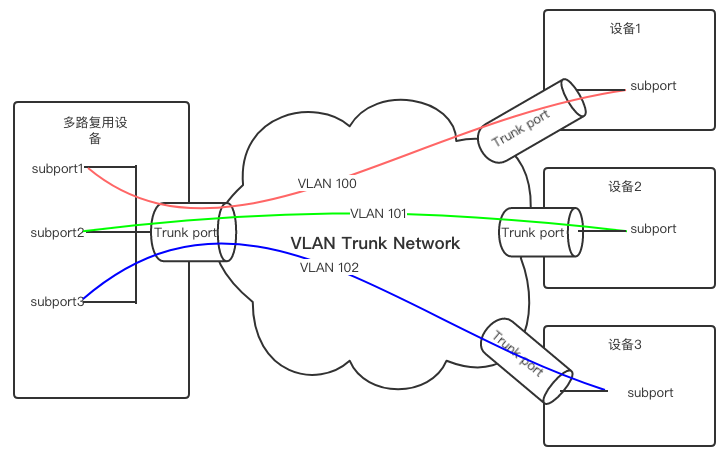
$ p# [* A* J& v3 g没有多余的网桥,没有网桥上换来换去的VLAN ID,仅仅是在入口和出口处去除VLAN Tag和打上VLAN Tag,几条流表就实现了所有的功能。简单的实现一般意味着更高的效率和更少的错误,因此使用SDN方式实现VLAN aware VMs更具有优势。 四、VLAN Trunk在NFV中的应用最后我们再看看VLAN Trunk在NFV中的应用吧,这个在最开头一些简单的介绍,这里来说个用例。一个多路复用设备,需要连接多个子设备,子设备的数目是不确定的,且有可能变化,并且要求子设备间网络是隔离的。当然,我也可以给多路复用设备配置多块网卡,但是由于子设备数目不确定,网卡数目是不确定的。这个时候可以将多路复用设备的一块Ethernet网卡配置成VLAN Trunk port,在之上创建相应的subport。子设备上的网卡也配置成VLAN Trunk port,并创建对应的subport。由于配置的VLAN不一样,不同子设备之间的网络是隔离的。并且多路复用设备的subport是可以动态删减的,这满足了子设备数据是不确定的要求。具体如下图所示:' _7 S5 g3 _0 D. d9 m- G% d
0 c. t( r- ]. |- d) M0 W5 R不论是VLAN Transparency还是VLAN aware VMs,都是为了使得OpenStack中的虚机能够使用Linux VLAN Trunk功能。VLAN Transparency依赖vSwitch和物理交换机的配置,不说实际物理交换机的复杂性,单就是vSwitch也不一定支持Trunk模式。VLAN aware VMs通过一系列的转换,摆脱了对vSwitch和物理交换机配置的依赖,走在网线上的数据甚至都可以不是VLAN数据,这比VLAN Transparency进了一步。而通过SDN实现VLAN aware VMs可以大大简化实现过程,又更进了一步。 |





 发表于 2018-12-4 10:15:57