找回密码
 注册
查看: 4179|回复: 1

cinder对接多个ceph存储

[复制链接]

1

主题

0

回帖

12

积分

管理员

积分
12
QQ
发表于 2021-2-5 08:00:08 | 显示全部楼层 |阅读模式

1. 检查cinder当前backend配置

使用cinder service-list,查看cinder-volume服务的Host字段格式。

旧版格式:

新版格式:

旧版中Host字段是cinder-volume服务所在节点的HOSTNAME,新版中Host字段是HOSTNAME@BACKEND。

如果是旧版,需要先修改为新版,见步骤2。

如果是新版,不需要修改,直接执行步骤3。


- N+ Y5 s+ P( ]" i+ M- F" j3 ]

2. 修改旧版backend配置为新版

编辑/etc/cinder/cinder.conf文件,删除其中原有的ceph backend相关配置:

[DEFAULT]rbd_store_chunk_size = 4rbd_max_clone_depth = 5rbd_flatten_volume_from_snapshot = truerbd_ceph_conf = /etc/ceph/ceph2.confrbd_pool = volumesrados_connect_timeout = -1volume_driver = cinder.volume.drivers.rbd.RBDDriver4 T. H0 d1 z7 J& Z4 _; O

添加如下配置:

[DEFAULT]enabled_backends = ceph2[ceph2]rbd_pool = volumes  (cephpool-name)rbd_ceph_conf = /etc/ceph/ceph2.confrbd_flatten_volume_from_snapshot = truerbd_max_clone_depth = 5rbd_store_chunk_size = 4rados_connect_timeout = -1glance_api_version = 2volume_backend_name=ceph2volume_driver = cinder.volume.drivers.rbd.RBDDriver
* h4 R- ^  y# b- a7 K% L

重启cinder-volume服务:

# service cinder-volume restart                    # 对于Ubuntu 14.04# systemctl restart openstack-cinder-volume        # 对于CentOS 7  w0 p, B, P& f( H4 z

执行cinder service-list,查看cinder-volume的Host字段是否变为新版格式。

然后更新已经创建的volume的host属性:

# cinder-manage volume update_host --currenthost HOSTNAME --newhost HOSTNAME@BACKEND$ E! @; v' [6 M" I

例如:

# cinder-manage volume update_host --currenthost node-1.domain.tld --newhost node-1.domain.tld @ceph# X% u, t; L0 M& `% s6 W

查看volume 的os-vol-host-attr:host属性已经变为HOSTNAME@BACKEND#RBD的格式:
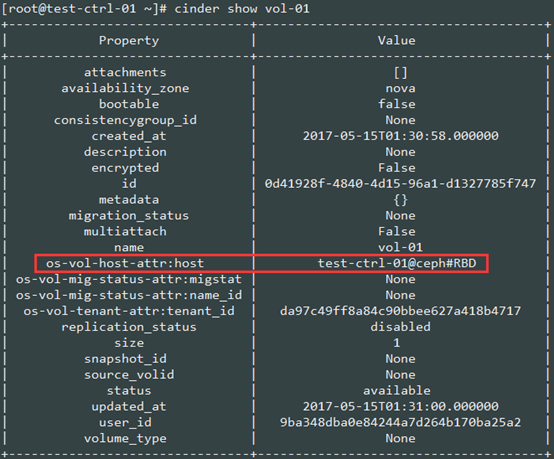
到此,旧版配置格式已经改成新版配置格式,进行步骤3添加另一个ceph后端。

* q9 Q1 L+ H4 I  _1 M

3. 添加一个ceph后端

将新的ceph集群的配置文件复制到所有openstack节点(包括控制节点和计算节点)。

注意:不同ceph集群依靠配置文件的名字区分,如:已有ceph集群的配置文件为/etc/ceph/ceph.conf,如果新集群全用SAS盘,配置文件可以命名为:/etc/ceph/ceph-sas.conf。

然后编辑/etc/cinder/cinder.conf,添加新的ceph backend,编辑完后的相关配置如下:

[DEFAULT]enabled_backends = ceph,ceph-new[ceph]rbd_pool = volumesrbd_ceph_conf = /etc/ceph/ceph.confrbd_flatten_volume_from_snapshot = truerbd_max_clone_depth = 5rbd_store_chunk_size = 4rados_connect_timeout = -1glance_api_version = 2volume_backend_name=cephvolume_driver = cinder.volume.drivers.rbd.RBDDriver[ceph-new]rbd_pool = volumesrbd_ceph_conf = /etc/ceph/ceph-new.confrbd_flatten_volume_from_snapshot = truerbd_max_clone_depth = 5rbd_store_chunk_size = 4rados_connect_timeout = -1glance_api_version = 2volume_backend_name=ceph-newvolume_driver = cinder.volume.drivers.rbd.RBDDriver/ k+ J: G4 d  p! A  s7 r

重启cinder-volume服务:

# service cinder-volume restart                    # 对于Ubuntu 14.04# systemctl restart openstack-cinder-volume        # 对于CentOS 7
' R$ X8 a3 |5 d2 Y! [, C  O

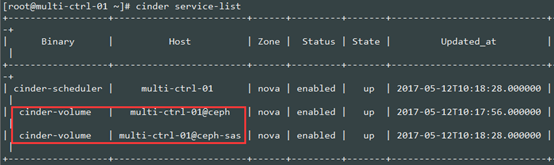
执行cinder service-list命令,可以看到每个后端对应一个cinder-volume服务:
" L1 R3 s, H( n. W( s6 Q- B3 ~- U

4. 配置volume-type

对于每个ceph后端,创建一个volume type,并将volume type关联配置文件中的volume_backend_name:

# cinder type-create ceph1# cinder type-key ceph set volume_backend_name=ceph1# cinder type-create ceph-new# cinder type-key ceph-new set volume_backend_name=ceph-new& C( [3 Y: U2 F

然后执行cinder type-list可以看到配置的volume type:


- ]# {, U/ C0 R+ U' x

5. 创建卷

此后创建卷时,可以指定volume type,将卷创建到指定的ceph后端:

# cinder create 30 --name vol-01 --volume-type ceph-new2 p! e/ ]* s0 j# ^* L4 C

前端也可选则volume type:
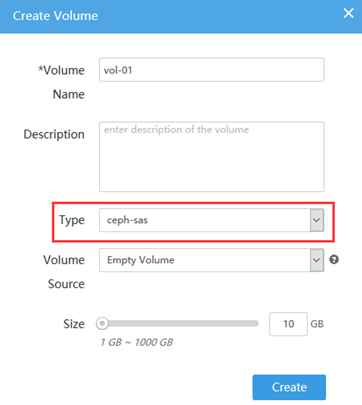
注:如果不指定volume type,cinder-scheduler会忽略volume type,按默认的调度器从所有cinder-volume调度。

0 e! J; y5 |# g( `9 w  D

1

主题

0

回帖

12

积分

管理员

积分
12
QQ
 楼主| 发表于 2021-2-5 08:00:09 | 显示全部楼层
1. 检查cinder当前backend配置
使用cinder service-list,查看cinder-volume服务的Host字段格式。
旧版格式:
新版格式:
旧版中Host字段是cinder-volume服务所在节点的HOSTNAME,新版中Host字段是HOSTNAME@BACKEND。
如果是旧版,需要先修改为新版,见步骤2。
如果是新版,不需要修改,直接执行步骤3。
. z% \# M- n0 [5 k$ I
2. 修改旧版backend配置为新版
编辑/etc/cinder/cinder.conf文件,删除其中原有的ceph backend相关配置:
[url=]https://common.cnblogs.com/images/copycode.gif[/url]
. k! }0 k; J" v1 L* y  y[DEFAULT]rbd_store_chunk_size = 4rbd_max_clone_depth = 5rbd_flatten_volume_from_snapshot = truerbd_ceph_conf = /etc/ceph/ceph.confrbd_pool = volumesrados_connect_timeout = -1volume_driver = cinder.volume.drivers.rbd.RBDDriver[url=]https://common.cnblogs.com/images/copycode.gif[/url]
/ C; F, E# D/ N0 g+ a; r. X6 ~0 I8 _' Z
5 ~6 B* m/ m$ i& K  M9 w) Y& Q
添加如下配置:
[url=]https://common.cnblogs.com/images/copycode.gif[/url]
2 ~8 S* k0 n  r- u2 ^[DEFAULT]enabled_backends = ceph[ceph]rbd_pool = volumesrbd_ceph_conf = /etc/ceph/ceph.confrbd_flatten_volume_from_snapshot = truerbd_max_clone_depth = 5rbd_store_chunk_size = 4rados_connect_timeout = -1glance_api_version = 2volume_backend_name=cephvolume_driver = cinder.volume.drivers.rbd.RBDDriver[url=]https://common.cnblogs.com/images/copycode.gif[/url]
8 e8 J3 Q  P; ^! y9 {3 O
% r9 @+ `' g! t
重启cinder-volume服务:
# service cinder-volume restart                    # 对于Ubuntu 14.04# systemctl restart openstack-cinder-volume        # 对于CentOS 7
) b7 N$ D$ q8 s# k% D  E
执行cinder service-list,查看cinder-volume的Host字段是否变为新版格式。
然后更新已经创建的volume的host属性:
# cinder-manage volume update_host --currenthost HOSTNAME --newhost HOSTNAME@BACKEND% H4 o8 E/ {: M8 t0 b
例如:
# cinder-manage volume update_host --currenthost node-1.domain.tld --newhost node-1.domain.tld @ceph
! |! ?+ M# G) Y3 @! l
查看volume 的os-vol-host-attr:host属性已经变为HOSTNAME@BACKEND#RBD的格式:
到此,旧版配置格式已经改成新版配置格式,进行步骤3添加另一个ceph后端。

% S! t4 W' H$ b" H4 m2 y/ {" J
3. 添加一个ceph后端
将新的ceph集群的配置文件复制到所有openstack节点(包括控制节点和计算节点)。
注意:不同ceph集群依靠配置文件的名字区分,如:已有ceph集群的配置文件为/etc/ceph/ceph.conf,如果新集群全用SAS盘,配置文件可以命名为:/etc/ceph/ceph-sas.conf。
然后编辑/etc/cinder/cinder.conf,添加新的ceph backend,编辑完后的相关配置如下:
[url=]https://common.cnblogs.com/images/copycode.gif[/url]
7 n3 D  E1 `* P* F4 ~5 l  L, \[DEFAULT]enabled_backends = ceph,ceph-sas[ceph]rbd_pool = volumesrbd_ceph_conf = /etc/ceph/ceph.confrbd_flatten_volume_from_snapshot = truerbd_max_clone_depth = 5rbd_store_chunk_size = 4rados_connect_timeout = -1glance_api_version = 2volume_backend_name=cephvolume_driver = cinder.volume.drivers.rbd.RBDDriver[ceph-sas]rbd_pool = volumesrbd_ceph_conf = /etc/ceph/ceph-sas.confrbd_flatten_volume_from_snapshot = truerbd_max_clone_depth = 5rbd_store_chunk_size = 4rados_connect_timeout = -1glance_api_version = 2volume_backend_name=ceph-sasvolume_driver = cinder.volume.drivers.rbd.RBDDriver[url=]https://common.cnblogs.com/images/copycode.gif[/url]: g# U5 S4 U. v0 F, j! J! S6 b
+ a4 [+ H. w5 c9 e1 M
重启cinder-volume服务:
# service cinder-volume restart                    # 对于Ubuntu 14.04# systemctl restart openstack-cinder-volume        # 对于CentOS 7
$ }" `' u. C/ P  W- L
执行cinder service-list命令,可以看到每个后端对应一个cinder-volume服务:

( S2 w+ |) c. U
4. 配置volume-type
对于每个ceph后端,创建一个volume type,并将volume type关联配置文件中的volume_backend_name:
# cinder type-create ceph# cinder type-key ceph set volume_backend_name=ceph# cinder type-create ceph-sas# cinder type-key ceph-sas set volume_backend_name=ceph-sas
: E5 h6 s! l4 D
然后执行cinder type-list可以看到配置的volume type:

$ \0 w( i- K/ r. ~# N# k
5. 创建卷
此后创建卷时,可以指定volume type,将卷创建到指定的ceph后端:
# cinder create 10 --name vol-01 --volume-type ceph-sas* n. D1 N6 O& l3 C6 A" I
前端也可选则volume type:
注:如果不指定volume type,cinder-scheduler会忽略volume type,按默认的调度器从所有cinder-volume调度。

: O! Q3 ?6 R4 q3 @+ o
您需要登录后才可以回帖 登录 | 注册

本版积分规则

返回首页|Archiver|手机版|小黑屋|易陆发现技术论坛 ( 蜀ICP备2026014127号-1 )

GMT+8, 2026-6-12 03:21 , Processed in 0.016022 second(s), 22 queries .

Powered by Discuz! X5.0

© 2001-2026 Discuz! Team.

快速回复 返回顶部 返回列表

